
How to Get the Lowest Hotel Price on Trivago UK
Learn how to get the lowest hotel price on Trivago UK using flexible dates, price filters, location tools, alerts, and smart booking comparisons.


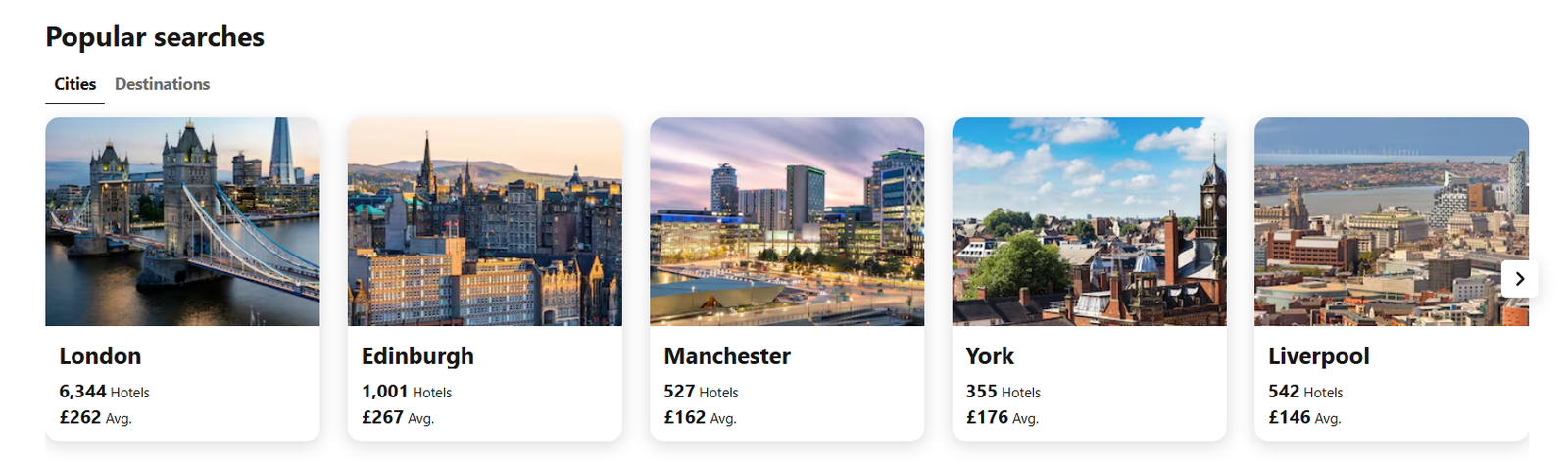
Finding a genuinely cheap hotel is not simply a matter of typing a destination into Google and clicking the first £80-per-night result. Hotel prices can differ significantly between booking sites, even for the same property and dates. That is where Trivago UK becomes useful: the platform currently compares hotel prices from hundreds of booking sites and displays different offers side by side. Its UK homepage currently lists more than 6,300 hotels for London, around 1,000 for Edinburgh and more than 500 each for Manchester, York and Liverpool.
The displayed average prices also vary considerably: London is currently around £263 per night, compared with roughly £82 for Blackpool, showing why destination and timing can matter as much as the hotel itself. (September 2026)
The important point is that the lowest price shown on a comparison page is not automatically the cheapest booking once cancellation terms, breakfast, room type and other conditions are considered. Getting the best deal requires a little more than sorting by price.
Start With Flexible Dates
The biggest saving opportunity often comes before choosing a hotel.
Enter your destination on Trivago UK, then look at nearby dates if your trip is flexible. Trivago currently displays indicative monthly price ranges for destinations, based on average prices for three-star hotels. For example, its current London data shows materially different average ranges across the year, with some winter months starting considerably lower than summer periods.
A one-day shift can sometimes change the available inventory and therefore the price. Sunday-to-Thursday stays can also behave differently from Friday and Saturday nights, particularly in cities with strong weekend demand.
For a flexible trip, compare:
- One day earlier and later
- A different weekend
- Midweek versus weekend
- One-week versus two-week date windows
- Nearby destinations or neighbourhoods
Don’t assume that the first dates entered are the cheapest ones.
Sort by Price, Then Filter Properly
Source: Trivago (September 2026)
Once the results appear, use the price ascending option rather than relying on the default order. Trivago hotel results also provide filters such as rating, location, breakfast included, parking, pool, free cancellation, Wi-Fi and accommodation type.
This matters because the absolute cheapest room may not actually meet your requirements.
For example, a £78 room without breakfast may cost more overall than a £88 room that includes breakfast for two. Likewise, a £75 hotel several miles outside the centre may require £15-£25 per day in transport.
A useful approach is to establish your actual requirements first:
| Requirement | What to check |
| Maximum price | Set a realistic nightly budget |
| Location | Distance from your main attraction or station |
| Breakfast | Included or additional charge |
| Cancellation | Free cancellation versus non-refundable |
| Rating | Guest rating and number of reviews |
| Parking | Free, paid or unavailable |
| Room type | Standard, family, suite or apartment |
| Wi-Fi | Included and available throughout |
| Final cost | Compare the actual booking offer before paying |
This turns Trivago from a simple price list into a more practical comparison tool.
Don’t Chase the Cheapest Nightly Rate
This is probably the most important trick.
Suppose three booking sites show the same hotel:
- £92 per night with breakfast
- £84 per night without breakfast
- £79 per night with a non-refundable rate
The £79 result looks cheapest, but it may not be the cheapest option for your trip.
Compare the same room, same number of guests, same dates and same cancellation conditions.
This is especially important because a hotel can have several offers on the same booking site. One may include breakfast, another may be room-only, and another may have stricter cancellation conditions.
Before clicking through, check what the displayed rate actually includes.
Use Location as a Pricing Tool
One of the easiest ways to lower a hotel bill is to broaden the search area slightly.
If central London is outside your budget, for example, compare hotels close to an Underground or rail connection rather than searching only within the city centre. The same principle applies to Manchester, Edinburgh, Liverpool and other UK destinations.
Trivago provides map-based searching, allowing travellers to see properties in relation to the area they actually want to visit. Its app also supports location-based hotel searches and map exploration.
A hotel that is £20 cheaper but requires an expensive taxi every day is not necessarily a saving. Look at the combined accommodation and transport cost.
Check Member Prices and App Deals
Another saving opportunity is signing into Trivago.
The current UK site promotes member-exclusive benefits, including loyalty deals and member prices. Trivago also promotes app-exclusive deals and price-drop notifications. That means it can be worth comparing the displayed price while signed out with the price available after logging in.
The app can also be useful when a trip is not ready to book immediately. Instead of repeatedly searching manually, price notifications can help identify when an offer changes.
Don’t Ignore the Booking Site Behind the Price
Source: Trivago (September 2026)
Trivago UK is a metasearch platform rather than the hotel operator for most bookings. It compares offers from multiple booking providers and then sends the traveller to the selected provider to complete the reservation.
That final step matters.
Before payment, check:
- Whether taxes are included
- Cancellation deadlines
- Prepayment requirements
- Breakfast conditions
- Deposit requirements
- Room occupancy
- Currency and payment terms
- Whether the selected room is still available
Prices can change between the comparison result and the booking provider, particularly when inventory is limited.
It is also worth checking the hotel’s own website for the identical room and conditions. Trivago may show a lower third-party rate, but a direct hotel rate could sometimes include extras such as breakfast, flexible cancellation or loyalty benefits that change the overall value.
Pay Attention to How Results Are Ranked
Price is not the only factor determining what appears on a Trivago results page.
Trivago’s own hotel-result pages include an explanation of how payments to the company can affect ranking. That is a useful reason not to interpret the first result as the cheapest or best hotel automatically.
For a budget-focused search, deliberately switch to price ascending, then apply the filters that matter to the trip. After that, compare the actual offers rather than relying on the default ranking.
A Simple Trivago UK Price-Hunting Routine
A practical search can take only a few minutes:
- Enter the destination and exact number of guests.
- Check nearby dates if your schedule allows.
- Sort results from lowest price upwards.
- Set a maximum nightly budget.
- Filter by location and essential facilities.
- Compare hotels with similar ratings.
- Open several offers for the same property.
- Match room type, breakfast and cancellation terms.
- Check the final price on the booking provider.
- Compare the identical room directly with the hotel.
- If the trip is flexible, consider waiting for a price alert.
The current Trivago UK site itself highlights price comparison across hundreds of sites and promotes notifications when prices drop, making this combination of comparison, filtering and monitoring more useful than simply searching for a generic “cheap hotel.”
What Actually Gets You the Lowest Price?
There is no single booking trick that guarantees the lowest hotel rate. Prices are dynamic, availability changes, and different providers can attach different conditions to apparently similar offers.
The more reliable strategy is to compare like for like and widen the variables that you can control: dates, neighbourhood, room type, cancellation policy and included extras.
The cheapest result is only a good deal when it remains the cheapest after everything you need for the stay is accounted for.
Trivago UK: FAQs
- How can I find the cheapest hotels on Trivago?
Use flexible dates, sort results by price ascending, broaden the location, and filter according to your essential requirements. Then compare the complete offers rather than just the headline nightly rate. - Does Trivago charge a booking fee?
Trivago primarily acts as a hotel metasearch platform. The booking is generally completed with the booking provider, so check that provider’s payment, cancellation and other terms before confirming. - Can changing dates really reduce hotel prices?
Yes, hotel pricing varies according to dates and availability. Trivago’s UK site itself displays different indicative price ranges across months for destinations, although these figures are averages and not guarantees for a particular stay.
Also Read: Traveloka Review: Is It Worth Using for Booking Flights and Hotels?