
The Remote Worker’s Essential Software Stack for 2026
Remote work has moved well beyond simply working from home with a laptop. In 2026, a typical remote professional may handle video meetings, team messages, shared documents, digital signatures, email, PDFs and AI-assisted research across several platforms every day. Gallup reports that among U.S. employees with remote-capable jobs, 52% work in a hybrid arrangement while 26% work fully remotely, making digital tools a central part of how modern teams operate. The remote worker’s essential software stack should therefore be built around a simple principle: every tool should solve a specific problem, save time or make collaboration easier rather than create another source of notifications and complexity.
What a Good Remote Work Stack Should Do
A useful software stack does not need to contain dozens of applications. It should cover the core activities that make up a remote workday: communication, meetings, email, documents, writing, file management and repetitive tasks.
The best setup also avoids unnecessary overlap. If one application already handles a particular job well, adding another tool simply because it is popular can make information harder to find. The objective is a connected workflow where each application has a clear purpose.
Communication: Keep Team Conversations Moving
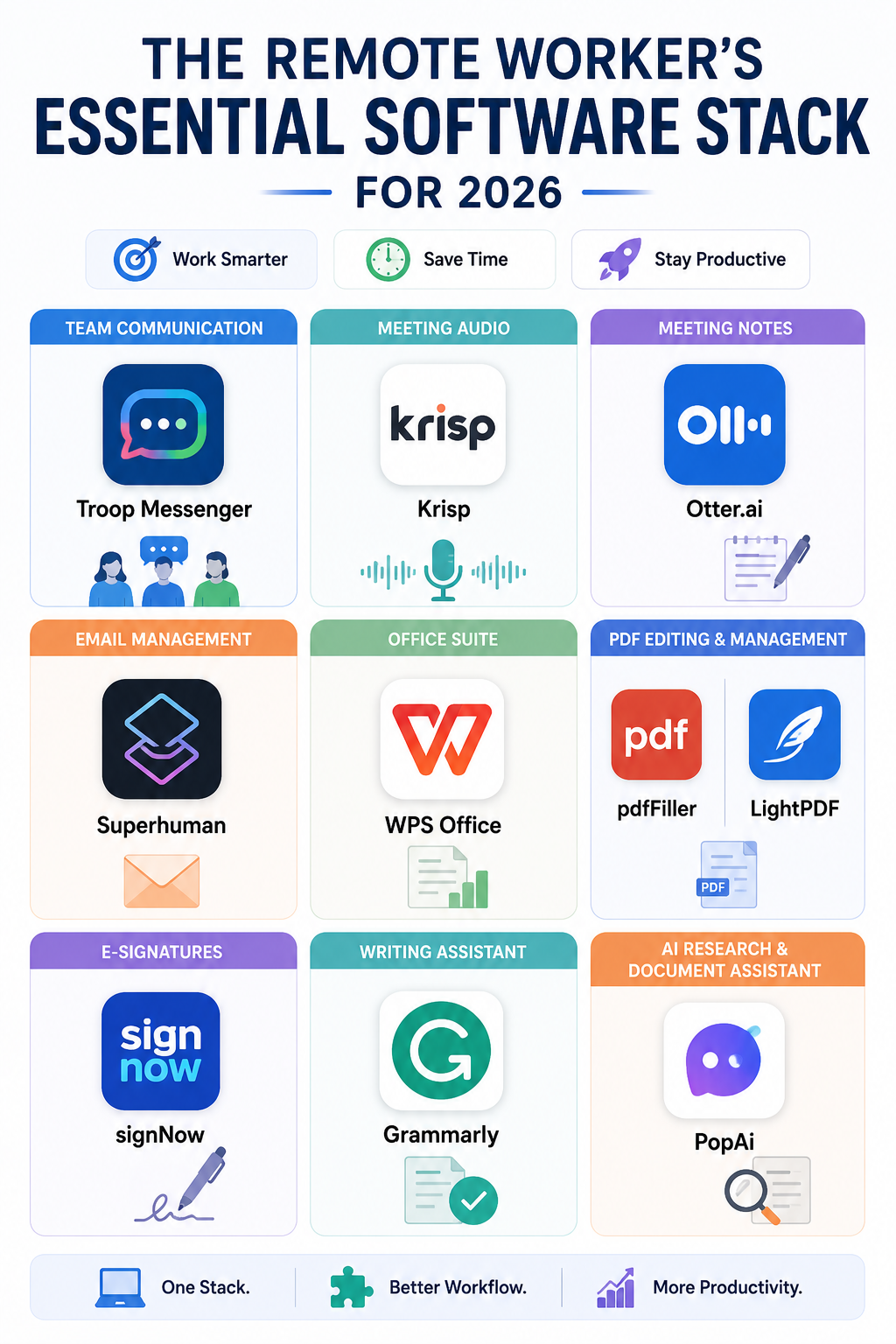
Remote teams need a reliable place for everyday conversations that do not belong in email. Troop Messenger can be useful for team messaging, file sharing and workplace collaboration, particularly for businesses that want a dedicated communication platform.
The bigger benefit comes from establishing communication rules. Quick questions can stay in chat, important decisions should be documented, and discussions that require several people should not become endless email chains. These simple boundaries prevent remote workers from searching through multiple platforms to understand what happened.
Meetings: Improve Both Audio and Notes
Meetings create two separate challenges for remote workers: poor audio can make conversations difficult to follow, while useful information can disappear once the call ends.
- Krisp addresses the first problem through AI-powered noise cancellation, making it useful when working from a home office, café or shared workspace.
- Otter.ai addresses the second by helping transcribe conversations and turn meetings into searchable notes, summaries and action items.
Together, these tools can make meetings more productive without requiring workers to spend the next hour reconstructing what was discussed.
Email: Spend Less Time in Your Inbox
Email remains one of the easiest places for a remote worker to lose focused time. Checking messages repeatedly, searching through old conversations and writing routine replies can break concentration throughout the day.
Superhuman is an email app designed around faster inbox management. Its features include keyboard shortcuts, AI-assisted writing, search, summaries, reminders and automated inbox organization. Instead of treating every email as something that requires immediate attention, users can process messages quickly, schedule follow-ups and use AI for repetitive drafting tasks.
For people who deal with a high volume of business email, this can become one of the most valuable parts of a remote worker’s essential software stack.
Documents and PDFs: Reduce App Switching
Remote workers frequently deal with contracts, proposals, invoices, reports and forms without having access to an office printer or document desk. That makes reliable document software particularly important.
- WPS Office covers everyday word-processing, spreadsheet and presentation requirements.
- For PDF-heavy workflows, pdfFiller can help with editing and completing documents.
- LightPDF offers tools for common PDF tasks such as conversion and editing.
- When documents need signatures, signNow provides an electronic-signature workflow that can eliminate the need to print, scan and send paperwork manually.
The right combination depends on the job. A consultant handling contracts will have different requirements from someone who mainly creates spreadsheets and presentations.
Writing and AI: Speed Up the First Draft
Remote work creates a heavier dependence on written communication, from emails and project updates to proposals and reports. That makes writing quality and speed important, particularly when colleagues and clients may rarely meet face to face.
- Grammarly can help identify grammar problems, improve clarity and adjust tone before a message is sent.
- PopAi can be useful for research and working with documents when the task involves extracting information, organizing material or developing an initial draft.
These tools work best when they support the worker rather than replace judgment. AI-generated information should still be checked, particularly when the final output contains facts, numbers, client information or business recommendations.
The Essential Software Stack at a Glance
| Work requirement | Useful software | Primary purpose |
|---|---|---|
| Team communication | Troop Messenger | Messaging and collaboration |
| Meeting quality | Krisp | Noise cancellation |
| Meeting documentation | Otter.ai | Transcripts and summaries |
| Email management | Superhuman | Faster inbox workflows |
| Office documents | WPS Office | Documents and spreadsheets |
| PDF editing | pdfFiller / LightPDF | PDF management |
| Digital signatures | signNow | E-signature workflows |
| Writing support | Grammarly | Clarity and grammar |
| AI research | PopAi | Research and document assistance |
Do Remote Workers Need All These Tools?
Not necessarily. A good stack is determined by the work you actually do, not by how many applications you can install.
For example, someone who spends most of the day in meetings may benefit more from Krisp and Otter.ai, while an executive handling hundreds of emails may get greater value from Superhuman. A freelancer working with contracts could prioritize pdfFiller and signNow, while a content professional may find Grammarly and PopAi more useful.
This is why the remote worker’s essential software stack should be reviewed every few months. Tools that once solved a genuine problem can become unnecessary when your role, team or workflow changes.
Avoid Building a Complicated Stack
The biggest mistake remote workers make is adding software without removing anything. Ten productivity applications do not automatically make a person more productive; they can actually create more notifications, duplicate files and fragmented information.
A better approach is to identify the parts of your workday that repeatedly consume time. If meetings are difficult to hear, fix the audio problem. If email takes hours, improve the inbox workflow. If contracts require repeated downloading, printing and scanning, move to a digital signing process.
The remote worker’s essential software stack should make your workday feel simpler after implementation, not more complicated.
Build Around Your Actual Workflow
Before choosing new software, track where your time goes for a typical week. Look for repetitive tasks, unnecessary app switching and activities that regularly interrupt focused work.
Then choose one tool to solve each significant problem and give yourself enough time to build a habit around it. The strongest remote setup is rarely the one with the most features. It is the one where communication is easy to find, meetings produce useful records, documents move smoothly, and routine work takes less manual effort.
In 2026, the goal of a remote software stack is not simply to help people work from anywhere. It is to create a digital workspace that removes friction while leaving more time for work that requires creativity, judgment and collaboration.
Frequently Asked Questions
1. What is a remote worker’s software stack?
It is the collection of digital tools a remote professional uses for communication, meetings, email, documents, collaboration, writing and other daily work.
2. Which tools are most important for remote workers?
The essentials depend on the role, but most remote workers need reliable communication, email, meeting, document and file-management tools. AI and automation tools can then be added where they solve repetitive problems.
3. What is useful for online meetings?
Krisp can improve meeting audio by reducing background noise, while Otter.ai can help capture transcripts, summaries and action items for later reference.
Also Read: How to Cut Your Email Time in Half: Superhuman, Shortcuts, and AI