
Shared Hosting vs VPS vs Cloud: Which Does Your Website Actually Need?
Choosing web hosting is no longer simply a question of finding the cheapest monthly plan. The type of server environment affects how much traffic a website can handle, how much control the owner gets, how easily resources can be increased, and how much technical work is involved. The shared hosting vs VPS vs cloud decision becomes particularly important as a website moves from a basic brochure site to an online store, content-heavy platform, SaaS application, or high-traffic business website.
The scale of today’s web also puts the decision into perspective. As of October 2026, WordPress alone is used by 40.1% of all websites, representing 58.6% of websites whose content management system is known, according to W3Techs. Hosting requirements among those sites can be dramatically different. A small local business website may work perfectly well on shared hosting, while an ecommerce store or application with unpredictable traffic may need dedicated resources or cloud infrastructure.
The right choice therefore isn’t necessarily the most powerful option. It is the hosting environment that provides enough resources and control without making the website unnecessarily expensive or complicated.
What Is Shared Hosting?
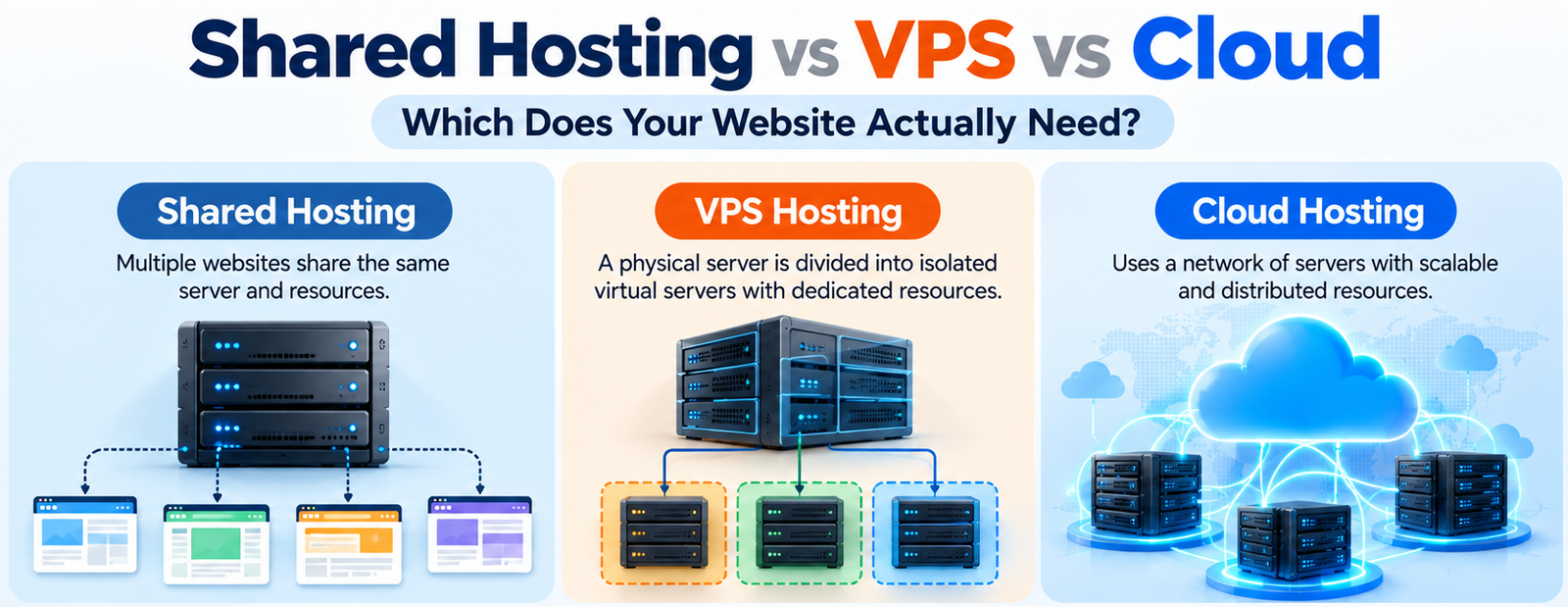
Shared hosting places multiple websites on the same physical server. CPU, RAM, storage and other server resources are shared between accounts, while the hosting company generally handles server maintenance and much of the technical infrastructure.
This is why shared hosting remains popular for beginners. The setup is straightforward, costs are low, and users usually don’t need to manage operating systems, server security or hardware.
It works particularly well for:
- Personal blogs
- Portfolio websites
- Small company websites
- Local businesses
- Basic WordPress sites
- Websites with predictable, modest traffic
The limitation is resource contention. If another website on the same server experiences a significant traffic spike, performance can potentially be affected. Shared hosting also provides considerably less server-level control than VPS hosting.
What Is VPS Hosting?
A Virtual Private Server divides a physical server into isolated virtual environments. Each VPS receives allocated resources and operates more like an independent server, giving the customer substantially more control than shared hosting. Root access is commonly available, depending on the provider and plan.
That makes VPS hosting a logical middle ground.
A growing website may move to VPS when shared hosting starts creating resource limitations, but the business does not yet need the complexity or architecture of a larger cloud deployment.
VPS is particularly suitable for:
- Growing ecommerce websites
- High-traffic WordPress sites
- SaaS applications
- Custom web applications
- Development environments
- Websites requiring specific server software
The trade-off is technical responsibility. An unmanaged VPS can require knowledge of Linux, security, updates, backups, networking and server configuration. Managed VPS plans reduce that workload but generally cost more.
What Is Cloud Hosting?
Cloud hosting uses virtualized infrastructure that can draw resources from a broader pool of interconnected servers. Depending on the architecture, resources can be increased or reduced as demand changes, while distributed infrastructure can provide greater redundancy than a single-server setup.
This makes cloud hosting particularly attractive when traffic isn’t predictable.
For example, an ecommerce website might receive normal traffic most of the year but experience major spikes during a sale. A cloud environment can provide considerably more flexibility than a fixed-capacity hosting setup.
Cloud hosting is commonly suited to:
- Large ecommerce stores
- SaaS platforms
- Applications with variable traffic
- High-growth websites
- Businesses serving international audiences
- Applications requiring high availability
However, “cloud” does not automatically mean better. Cloud infrastructure can involve additional configuration, monitoring and usage-based charges. Some cloud platforms also have complicated billing structures involving compute, storage, bandwidth and other services. DigitalOcean specifically recommends considering base pricing, data-transfer costs and additional services when evaluating cloud costs.
Shared Hosting vs VPS vs Cloud: The Real Difference
| Factor | Shared Hosting | VPS Hosting | Cloud Hosting |
|---|---|---|---|
| Cost | Lowest | Medium | Varies |
| Resources | Shared | Allocated to VPS | Flexible/distributed |
| Performance | Good for smaller sites | More predictable | Strong and scalable |
| Scalability | Limited | Usually requires upgrade | High |
| Control | Low | High | High |
| Technical skill | Low | Medium to high | Medium to high |
| Traffic spikes | Less suitable | Better | Best suited |
| Maintenance | Mostly managed | Depends on plan | Depends on provider |
| Best for | Small websites | Growing websites | High-growth/variable workloads |
Which Hosting Type Should You Choose?
For a new website, shared hosting is usually the sensible starting point. Paying for cloud infrastructure before the site has meaningful traffic simply adds cost and complexity without necessarily improving the visitor experience.
VPS becomes more compelling when resource limits, custom software requirements or increased traffic make shared hosting restrictive. It gives the owner more predictable resources and significantly greater control.
Cloud hosting makes the most sense when scalability and availability are genuine requirements rather than buzzwords. If traffic fluctuates substantially or the application needs infrastructure that can expand quickly, cloud architecture can justify its additional complexity.
That is the practical takeaway from the shared hosting vs VPS vs cloud debate: choose according to the website’s workload, not the marketing label attached to the hosting plan.
Cost Isn’t the Only Number to Compare
The advertised monthly price tells only part of the story. Before choosing a plan, check renewal rates, included backups, SSL, bandwidth policies, storage type, support, migration assistance and whether resources are genuinely allocated or subject to usage limits.
For VPS and cloud hosting, also examine whether server management is included. A cheap unmanaged server can become expensive in staff time if nobody on the team knows how to maintain it.
Security and backups deserve particular attention. A hosting provider may advertise automated backups, but the retention period, restoration process and frequency can vary considerably.
FAQs
1. Is shared hosting enough for a small business website?
Usually, yes. A basic company website with relatively predictable traffic generally does not need VPS or cloud infrastructure.
2. Is cloud hosting faster than VPS?
Not automatically. Performance depends on the provider, hardware, configuration, application and workload. Cloud’s major advantage is flexibility and scalability rather than a guaranteed speed increase.
3. Is VPS more secure than shared hosting?
VPS provides stronger resource and environment isolation, but security still depends heavily on configuration, updates, access controls and server management.