Skip to content
US Edition · Wednesday, Sep 2 2026 Deals & brand guides updated daily
VPN Speed Explained: Why Your Connection Slows and How to Fix It

VPN Speed Explained: Why Your Connection Slows and How to Fix It

VPN speed is often blamed when a connection suddenly feels slower, but the VPN itself is only one part of the equation. Your original internet connection, distance to the VPN server, encryption method, server congestion, Wi-Fi quality and even the website you are accessing can all affect performance. A fast 500 Mbps broadband connection, for example, does not guarantee 500 Mbps through a VPN. Encryption adds processing, traffic takes a longer route, and the VPN server becomes another point between your device and the internet. The good news is that a large slowdown is not inevitable. With the right server, protocol and network settings, most users can recover much of their normal performance.
VPN Speed Explained: Why Your Connection Slows and How to Fix It

What Actually Happens When You Use a VPN?

Without a VPN, your device normally connects to your internet service provider and then to the website or service you are using.

A VPN adds an encrypted tunnel between your device and a VPN server. Your traffic travels through that server before reaching its destination.

That extra journey creates three main sources of slowdown:

  • Encryption: Your device and the VPN server must encrypt and decrypt traffic.
  • Distance: Data may travel hundreds or thousands of extra kilometres.
  • Server load: Your connection shares the VPN infrastructure with other users.

There is also an important distinction between speed and latency. Speed affects how quickly large files or videos can transfer, while latency measures the delay before data starts moving. A VPN can leave your download speed reasonably high while noticeably increasing latency, which becomes more obvious during gaming, video calls and remote desktop sessions.

The Biggest Causes of VPN Slowdowns

Cause What You May Notice What Usually Helps
Distant server Higher latency Choose a nearby server
Server congestion Unstable speeds Change server
Heavy encryption Lower throughput Try a modern protocol
Weak Wi-Fi Slow connection everywhere Improve Wi-Fi
ISP limitations Low speed before VPN Check baseline speed
VPN app settings Unexpected slowdown Review protocol/settings
Device limitations Slow performance on one device Test another device

How to Fix VPN Slowdowns

1. Check Your Normal Speed First

Before changing anything inside your VPN app, switch the VPN off and run a speed test.

This gives you a baseline.

If your internet connection delivers only 80 Mbps without the VPN, there is little point expecting 300 Mbps while connected to one. Likewise, if you normally receive 500 Mbps but get only 40 Mbps through the VPN, you have a genuine performance problem worth investigating.

Run the test several times at different times of day. Internet speeds fluctuate because of Wi-Fi interference, household traffic and ISP congestion.

2. Choose a Nearby Server

The simplest solution is often the most effective.

If you are physically located in New York and connect to a VPN server in Singapore, your traffic has a much longer journey than it would through a server in New York, Chicago or another nearby location.

You do not always need the geographically closest server, because a nearby server can be congested. Try two or three locations in the same region and compare their results.

For streaming or browsing, a nearby server is usually preferable unless you specifically need an IP address from another country.

3. Change the VPN Protocol

The protocol determines how your VPN connection is established and how data moves through the encrypted tunnel. Different protocols can produce noticeably different performance.

Modern options such as WireGuard are designed with speed and efficiency in mind and are now widely supported by commercial VPN providers. OpenVPN remains popular because of its maturity and flexibility, but it can perform differently depending on the device and configuration.

If your VPN application offers a protocol selection, test the available options rather than assuming the default is optimal.

This is one of the easiest ways to improve VPN speed without changing your internet plan.

4. Stop Connecting to an Overloaded Server

A VPN provider might advertise thousands of servers, but that does not mean every server will perform equally well.

During busy periods, a popular server can become congested. You may notice slow downloads, buffering or inconsistent performance even though your normal internet connection is working perfectly.

If the application displays server load, use it as a guide. Otherwise, connect to another nearby server and compare.

Do not automatically choose a server labelled “fastest” either. Test it yourself. Your physical location, ISP and network route can produce different results from another user’s experience.

5. Check Whether Wi-Fi Is the Real Problem

Sometimes the VPN gets blamed for a problem that already exists on the local network.

  • Try connecting your computer directly to the router with Ethernet. If performance improves dramatically, your Wi-Fi is probably contributing to the slowdown.
  • You can also test from a different room, move closer to the router or switch between the 2.4 GHz and 5 GHz/6 GHz bands where supported.
  • If the connection is slow with the VPN turned off, fixing the local network should come before changing VPN providers.

6. Turn Off Features You Don’t Need

Some VPN applications include additional privacy and security functions such as malware filtering, tracker blocking, double VPN routing or specialised servers.

These can be useful, but certain features deliberately send your traffic through additional processing or servers.

For ordinary browsing, you generally do not need a multi-hop connection simply to maximise performance. If your VPN has several advanced routing options enabled, temporarily disable them and compare the result.

The objective is not to turn off security unnecessarily. It is to understand which features are affecting performance.

7. Test Different Websites and Services

A slow VPN connection does not always mean the VPN is slow.

The website you are visiting may have overloaded servers, bandwidth limitations or a poor route to your VPN provider. A video platform might work perfectly while a particular download server performs badly.

Test several destinations. Try a speed-test service, a major website and the service that is actually giving you trouble.

If only one website is slow, replacing your VPN may not solve the problem.

8. When Changing VPN Providers Makes Sense

If you have tested nearby servers, different protocols, your Wi-Fi and multiple destinations, and the connection remains dramatically slower, the provider may simply have poor infrastructure for your location.

Look beyond marketing claims such as “the world’s fastest VPN.” What matters is how the service performs from your country, ISP and devices.

Before subscribing for a long period, use a provider’s trial or money-back period to test several servers at different times of day. Download a large file, stream high-resolution video and run latency tests rather than relying on a single speed-test result.

Practical Fixes Worth Trying

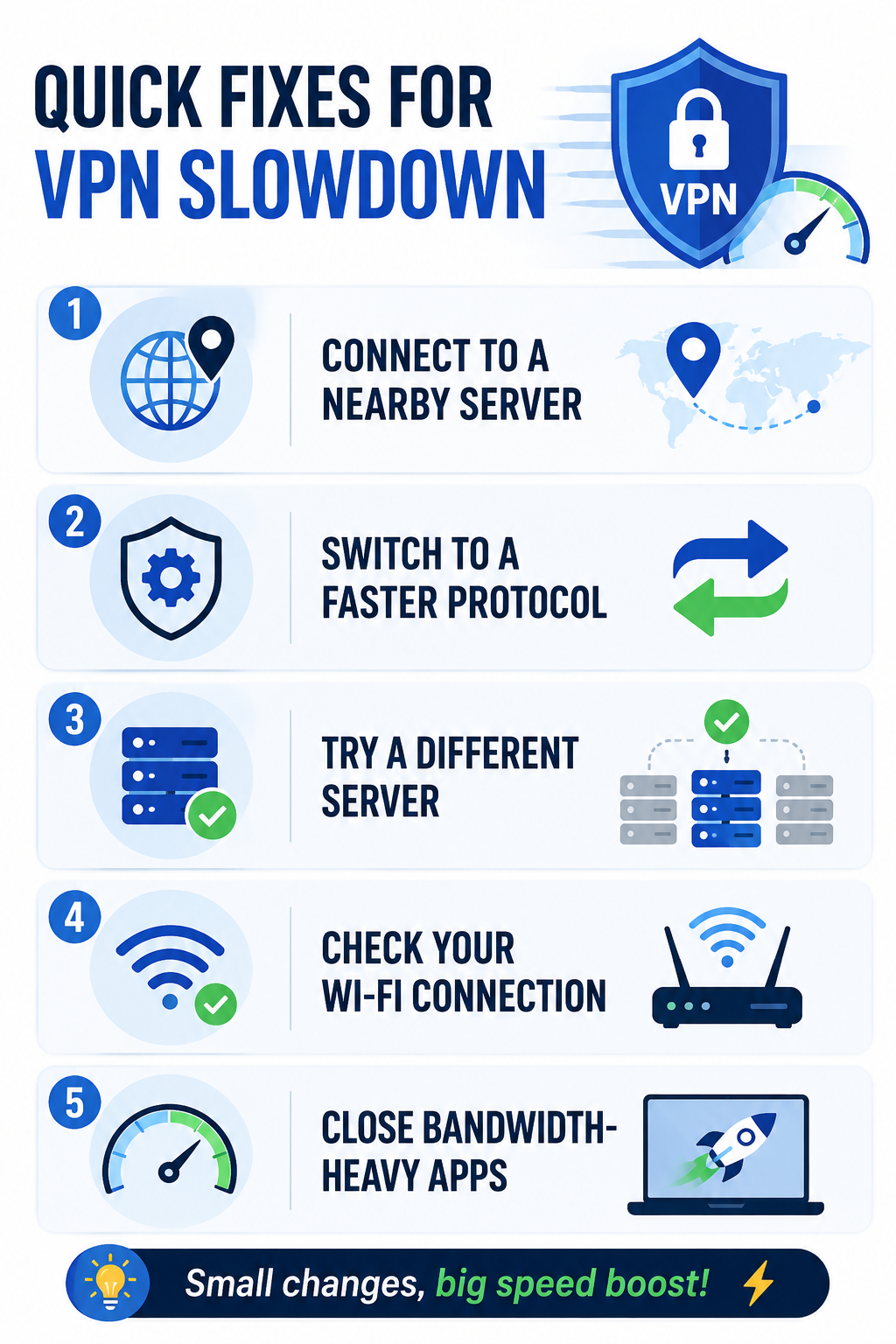
If your VPN speed has suddenly dropped, work through these steps in order:

  • Test your internet without the VPN.
  • Restart the VPN connection.
  • Switch to a nearby server.
  • Try another server in the same city or country.
  • Change from a slower protocol to WireGuard if available.
  • Test Ethernet instead of Wi-Fi.
  • Close bandwidth-heavy applications.
  • Disable unnecessary multi-hop or advanced routing features.
  • Update the VPN application.
  • Test again at a different time.

This process is more useful than immediately uninstalling the VPN because it helps identify where the slowdown actually originates.
VPN Speed

Does a Faster VPN Always Mean Better Privacy?

No. Performance should not be evaluated separately from privacy and security.

A provider might deliver excellent speeds while offering weak privacy practices, questionable logging policies or limited security controls. Conversely, a privacy-focused VPN may sacrifice some performance because of its infrastructure or security configuration.

The sensible approach is to find a service that provides the security features you need while delivering acceptable performance for your particular connection.

Frequently Asked Questions

1. How much speed does a VPN normally reduce?

There is no universal percentage. The impact depends on your ISP, device, protocol, server distance, congestion and network conditions. A nearby, well-connected server can perform much better than a distant or overloaded one.

2. Why is my VPN fast for browsing but slow for downloads?

Different activities use bandwidth differently. A download can expose throughput limitations that are barely noticeable when loading ordinary webpages. The download server itself may also be limiting your connection.

3. Does VPN location affect speed?

Yes. A distant server generally increases latency and can reduce performance because your data has to travel farther. Nearby servers are usually the better choice when location masking is not your primary requirement.

The most useful way to think about VPN speed is not as a fixed number advertised by a provider, but as the performance you actually receive between your device, VPN server and destination. Start with a baseline, choose nearby infrastructure, test protocols and eliminate local network problems before deciding that the VPN itself is the problem.
How to Choose a VPN: 7 Features That Matter (and 5 That Don’t)

How to Choose a VPN: 7 Features That Matter (and 5 That Don’t)

Choosing a VPN in 2026 is less about picking the provider with the biggest server count and more about matching the service to how you actually use the internet. How to choose a VPN starts with understanding what you want to protect. A frequent traveller may need reliable connections on hotel Wi-Fi, a remote employee may care about split tunnelling and a kill switch, while a privacy-focused user should be more concerned about logging practices and independent audits.

Services such as ExpressVPN, Surfshark and NordVPN now offer far more than basic IP masking. The trick is separating genuinely useful features from marketing extras. Learn how to choose a VPN by comparing speed, security, privacy, server locations, device support, pricing, and features that actually matter, in this blog.

How to Choose a VPN: 7 Features That Matter (and 5 That Don't)

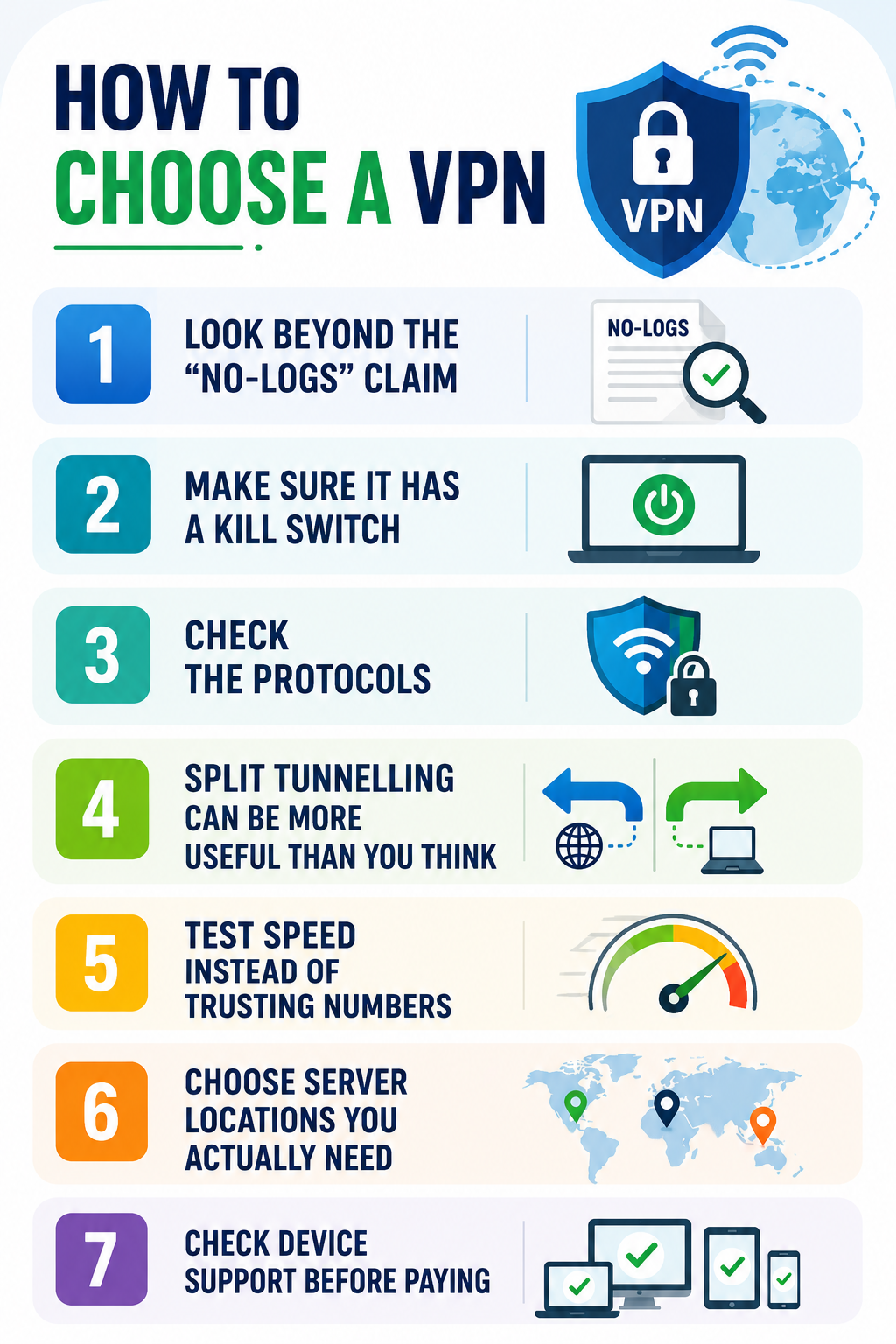
1. Look Beyond the “No-Logs” Claim

A VPN provider can potentially see information about your connection, so its data practices deserve more attention than the colour of its app or the number of countries advertised.

Do not stop at a “no-logs” badge. Read what the company actually says it stores, whether connection data is retained and whether its claims have been independently examined. ExpressVPN, for example, says its TrustedServer technology uses RAM-only servers and that its no-logs policy has been independently audited.

Practical tip: Before subscribing, search the provider’s privacy policy for terms such as activity logs, connection logs, IP address, timestamps, diagnostic data and third-party sharing. If the explanation is difficult to understand, that itself is worth considering.

2. Make Sure It Has a Kill Switch

A VPN is useful only while its protected connection is active. If that connection suddenly drops, your device could revert to its normal internet connection.

A kill switch prevents this by blocking internet traffic when the VPN disconnects. ExpressVPN calls its feature Internet Kill Switch, while Surfshark and NordVPN offer similar protection.

This is particularly useful when travelling or working from public networks.

Practical tip: Do not simply assume the feature works. After installing the VPN, enable the kill switch and test what happens when you manually disconnect the VPN. Check that your internet traffic stops rather than continuing normally.

3. Check the Protocols

VPN protocols affect how your connection balances security, speed and reliability. You do not need to understand the underlying cryptography, but you should avoid choosing a provider simply because it promises “military-grade security.”

ExpressVPN’s Lightway protocol is designed for quick connections and stable switching between networks, while NordVPN supports NordLynx alongside OpenVPN and other protocols.

Practical tip: If the VPN gives you a protocol choice, test the recommended modern protocol first. If connections become unstable, try another supported protocol rather than immediately changing providers.

4. Split Tunnelling Can Be More Useful Than You Think

Split tunnelling allows some apps to use the VPN while other traffic goes directly through your normal connection. This becomes useful when you need a VPN for work but still want local services to operate normally.

ExpressVPN’s split tunnelling, for example, can allow selected applications to use the VPN while devices such as printers and local network services remain accessible. Surfshark offers a similar feature called Bypasser.

Practical tip: If your work software requires a VPN but your banking app or smart-home devices behave strangely while it is active, try split tunnelling before disabling the VPN completely.

5. Test Speed Instead of Trusting Numbers

A VPN inevitably adds another step between your device and the destination website. The impact can vary according to your location, server load, protocol and distance from the selected server.

A provider claiming to have thousands of servers does not automatically mean it will be faster for you.

Practical tip: Test a VPN from your normal location at different times of day. Try a video call, a large download and an ordinary browsing session. Real-world performance tells you more than a promotional speed figure.

6. Choose Server Locations You Actually Need

Server coverage matters, but only in relation to your own routine. If you regularly travel between India, Europe and Southeast Asia, those locations matter more than having hundreds of additional countries you will never use.

Surfshark advertises more than 4,500 servers, while NordVPN’s network covers a large number of locations worldwide.

Practical tip: Make a list of five countries you genuinely expect to connect from or to. Check whether the provider has suitable locations there before comparing headline server numbers.

7. Check Device Support Before Paying

A VPN subscription is not particularly useful if it works well on your laptop but creates problems on your phone, tablet or smart TV.

Consider the devices you actually use. ExpressVPN, Surfshark and NordVPN support multiple major platforms, but specific features can differ between operating systems.

Practical tip: Check whether the exact feature you want, such as split tunnelling or a kill switch, is available on your operating system. Do not assume that a feature advertised on the provider’s homepage works identically everywhere.

How to Choose a VPN

Five Features That Shouldn’t Decide Your Purchase

Not every extra feature is useless, but these should not outweigh privacy, security and reliability when you’re comparing providers.

  • Huge server count: More servers do not necessarily mean better speed or reliability.
  • Dedicated IP: Useful for specific business needs, but unnecessary for most everyday users.
  • Built-in extras: Antivirus, storage and other add-ons can be convenient but are not essential VPN features.
  • Unusual location tools: Features such as GPS spoofing are helpful only for particular use cases.
  • “Complete anonymity” claims: A VPN can improve privacy, but it cannot make you completely anonymous online.

A dedicated IP, for example, can be useful for business systems that repeatedly check your IP address, but it is unnecessary for ordinary browsing. Surfshark and ExpressVPN both offer dedicated or static IP options for specialised use cases.

Likewise, bundled antivirus, password managers or cloud storage can be convenient, but do not pay extra for them if you already use separate tools you prefer.

How to Choose a VPN Based on Your Situation

The most useful way to think about how to choose a VPN is to start with the situation rather than the brand.

Your Situation Prioritise
Frequent traveller Kill switch, speed, server coverage
Remote worker Split tunnelling, reliability, dedicated IP
Public Wi-Fi user Encryption, leak protection, kill switch
Privacy-focused user No-logs evidence, audits, secure protocols
Streaming user Speed, nearby servers, stable connections
Occasional home user Simplicity, price and basic protection

If you are comparing ExpressVPN, Surfshark and NordVPN, do not ask which one is universally “best.” Ask which one fits your devices, locations, budget and privacy requirements.

For example, ExpressVPN’s Lightway and split tunnelling make it interesting for people who move between networks and need flexible routing. Surfshark’s Bypasser, NoBorders and kill switch can appeal to users who want more control over which traffic goes through the VPN. NordVPN offers multiple protocols, DNS leak protection, and an automatic kill switch alongside its broader security features.

Practical VPN Buying Checklist

Before entering your payment details, spend five minutes checking these points:

  • Read the complete privacy policy, not just the homepage.
  • Confirm the kill switch works on your device.
  • Check available server locations for your regular destinations.
  • Test speeds during your normal usage.
  • Check whether split tunnelling is supported on your operating system.
  • Review the renewal price rather than only the introductory offer.
  • Check the refund or trial conditions before subscribing.
  • Avoid providers promising complete online anonymity.

This is where how to choose a VPN becomes much easier. You do not need every feature. You need the handful that solve your actual problems without introducing unnecessary cost or complexity.

Frequently Asked Questions on How to Choose a VPN

1. Is a more expensive VPN automatically better?

No. Price does not guarantee better privacy or performance. Compare logging practices, security features, speed, device support and independent verification before considering the subscription cost.

2. Do I need a dedicated IP?

Usually not. It becomes useful when a business service, remote-access system or other application benefits from a consistent IP address.

3. Is a VPN enough to protect my device?

No. A VPN protects network traffic, but it does not replace software updates, strong passwords, multifactor authentication, backups or protection against phishing and malware.

Ultimately, choosing a VPN is not about finding the provider with the most impressive feature page. It is about identifying the risks you actually face and paying for features that address them. For most users, privacy practices, a reliable kill switch, modern protocols, leak protection, useful server locations and consistent speed matter far more than a giant server counter or a bundle of unrelated extras.

Do You Actually Need a VPN in 2026? An Honest Answer

Do You Actually Need a VPN in 2026? An Honest Answer

A VPN is often marketed as a simple privacy switch, but the reality is more nuanced. Do you actually need a VPN in 2026? For some people, it is a genuinely useful security and privacy tool; for others, it may be an unnecessary monthly expense. VPN usage has also grown alongside internet restrictions and privacy concerns. Proton VPN reported major download increases across 62 countries in 2025, with some spikes connected to censorship, internet shutdowns and new privacy rules.

At the same time, CISA continues to recommend VPNs or other secure-access solutions for certain remote-work and public-network situations, while warning that VPNs themselves can have security weaknesses.

Do You Actually Need a VPN in 2026

What a VPN Actually Does

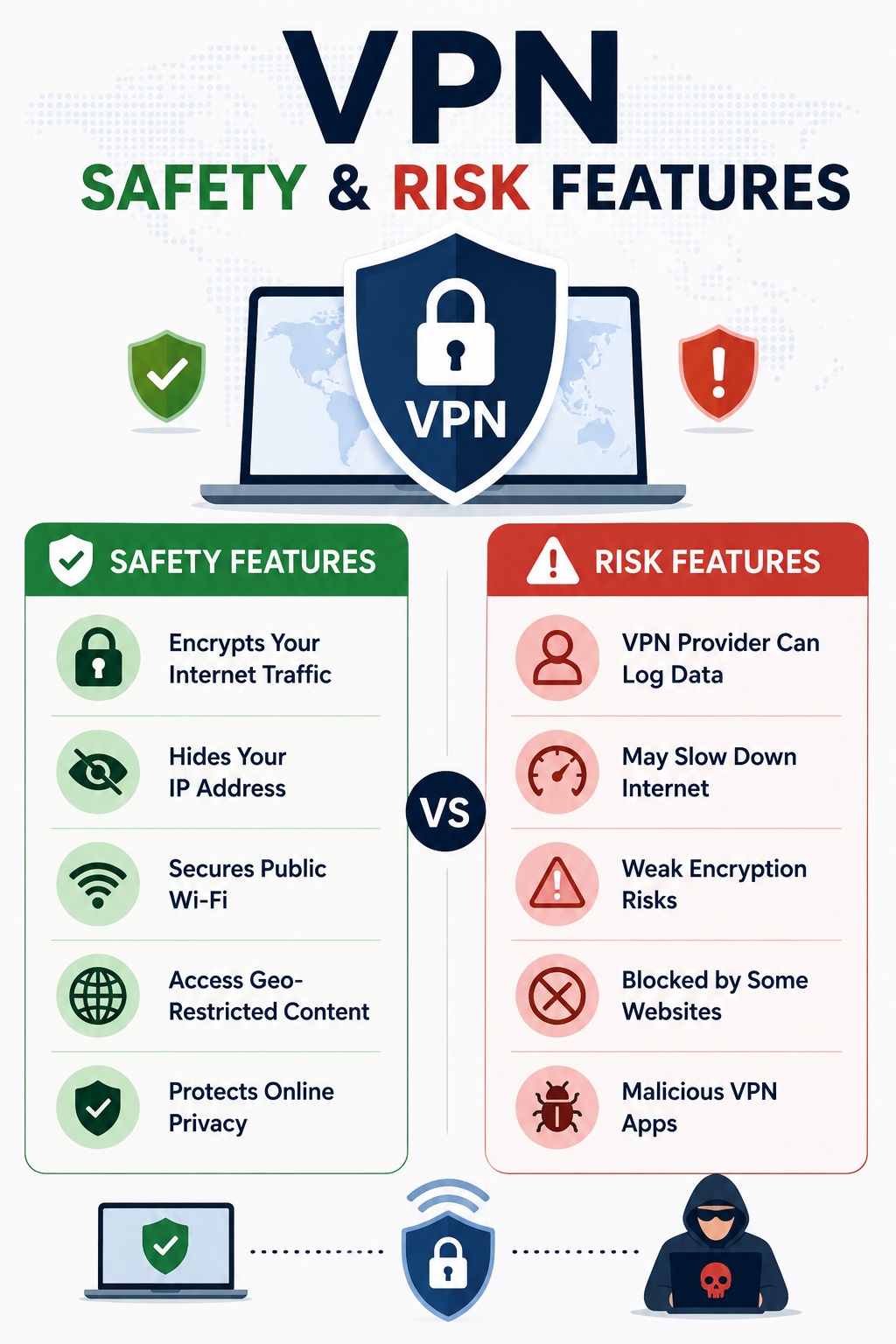
A VPN (Virtual Private Network) creates an encrypted connection between your device and a VPN server. Instead of websites seeing your normal public IP address, they generally see the VPN server’s address. This can make your traffic less exposed on networks you do not control and can reduce the amount of browsing information visible to your internet provider.

That does not make you anonymous. Websites can still identify you through accounts, cookies, browser characteristics and other tracking technologies. You are also placing some trust in the VPN company, so choosing the provider matters.

Who Has a Good Reason to Use One?

Frequent travellers are among the clearest candidates.

  • Hotel, airport and café networks are outside your control, and public Wi-Fi can create additional security risks.
  • CISA recommends using a VPN or another authorised secure-access solution when connecting to third-party networks in certain work environments.

Remote employees may also need a VPN to access company systems.

  • In this case, the VPN is primarily an access and security mechanism rather than a tool for hiding everyday browsing.
  • Businesses are increasingly considering Zero Trust, SASE and other modern approaches alongside traditional VPN infrastructure.

Privacy-conscious users have another reason.

  • A VPN can prevent your ISP or someone operating the local network from having the same visibility into your connection.
  • However, that privacy benefit depends heavily on the VPN provider’s policies and technical practices.

Who Probably Does Not Need One?

If you mainly browse from a secure home network, use HTTPS websites, keep your devices updated and have strong account security, a VPN may not add enough value to justify another subscription.

A VPN is also not necessary simply because you occasionally use public Wi-Fi. Modern websites generally use HTTPS encryption, which protects the contents of normal web connections. A VPN can provide another layer, but it should not be treated as the only protection you need.

A VPN Is Not Antivirus Software

This is where VPN marketing can create unrealistic expectations. A VPN does not automatically stop phishing, malware, malicious browser extensions or stolen passwords.

If you click a fake banking link and enter your credentials, a VPN cannot recognise the scam for you. Similarly, if malware is already installed on your laptop, routing your connection through a VPN does not remove it.

A sensible security setup still includes software updates, strong passwords, multifactor authentication, device security and careful handling of suspicious links and downloads.

The VPN Provider Becomes Part of the Trust Chain

Using a VPN does not eliminate trust; it moves some of it. Your internet provider may have less visibility into your connection, but the VPN provider becomes responsible for handling that traffic.

Before choosing a service, check its privacy policy, ownership, data-retention practices and whether its privacy claims have undergone independent audits. Be cautious about providers promising complete anonymity or protection against every type of online threat.

Security agencies have also pointed out that VPNs themselves can be vulnerable. CISA and its partners identified more than 22 known exploited vulnerabilities associated with VPN solutions and have warned organisations to keep VPN systems properly secured and updated.

What About Streaming and Changing Your Location?

Changing your apparent IP location is another major reason people subscribe to VPN services. A VPN can route your connection through a server in another country, but this does not guarantee access to every region-specific website or streaming catalogue.

Streaming platforms actively detect and block many VPN addresses, so performance and accessibility can change without warning. A VPN should therefore not be purchased solely on the assumption that it will permanently unlock every service available in another country.

Do You Actually Need a VPN in 2026

How to Decide If You Need One

Your Situation VPN Value
Frequent public Wi-Fi High
Regular international travel High
Employer requires VPN access High
Strong privacy concerns Moderate to high
Occasional home browsing Low
Secure home network Low
Expecting complete anonymity Not realistic
Looking for antivirus protection Not the right tool

This is why do you actually need a VPN in 2026 is better answered by looking at your habits rather than following a universal recommendation. If you travel frequently, work remotely or regularly connect through networks you do not trust, a VPN can be a sensible addition.

For someone who spends most of their time on a properly secured home network, the priorities may be different. Strong account protection, multifactor authentication, updated software and careful browsing habits could provide more practical value than adding another subscription.

How to Choose a VPN

Do not select a provider simply because it offers the biggest discount or the largest server count. Start by checking what information it collects and how long it retains that information.

Look for modern protocols, a reliable kill switch, clear privacy documentation, independent security assessments and a transparent company structure. Connection speed is also important because an impressive privacy policy is less useful if the service makes normal browsing, video calls or downloads frustratingly slow.

Do you actually need a VPN in 2026? The answer becomes clearer when you identify the specific problem you want to solve. Buy one because you need additional privacy on untrusted networks or secure remote access, not because an advertisement suggests that the internet is otherwise completely unsafe.

Frequently Asked Questions on Do You Actually Need a VPN in 2026

1. Does a VPN make me anonymous?

No. It can hide your IP address and encrypt the connection to the VPN server, but websites can still identify you through accounts, cookies and other tracking methods.

2. Is a VPN necessary on home Wi-Fi?

Usually not for ordinary browsing if your router, devices and accounts are properly secured. A VPN may still be useful if you have a specific privacy requirement.

3. Does a VPN protect against hackers?

Only to a limited extent. It can protect the connection between your device and VPN server, but it does not replace device security, updates, multifactor authentication or protection against phishing.

Ultimately, do you actually need a VPN in 2026? There is no universal answer. A VPN is neither a useless gimmick nor an essential requirement for every internet user. It is one security and privacy layer that becomes particularly valuable when your circumstances call for it. The smartest approach is to understand what it protects, recognise what it cannot do and choose a service based on your actual needs rather than fear-driven marketing.