
How to Choose a VPN: 7 Features That Matter (and 5 That Don’t)
Learn how to choose a VPN by comparing speed, security, privacy, server locations, device support, pricing, and features that actually matter.

Choosing a VPN in 2026 is less about picking the provider with the biggest server count and more about matching the service to how you actually use the internet. How to choose a VPN starts with understanding what you want to protect. A frequent traveller may need reliable connections on hotel Wi-Fi, a remote employee may care about split tunnelling and a kill switch, while a privacy-focused user should be more concerned about logging practices and independent audits.
Services such as ExpressVPN, Surfshark and NordVPN now offer far more than basic IP masking. The trick is separating genuinely useful features from marketing extras. Learn how to choose a VPN by comparing speed, security, privacy, server locations, device support, pricing, and features that actually matter, in this blog.
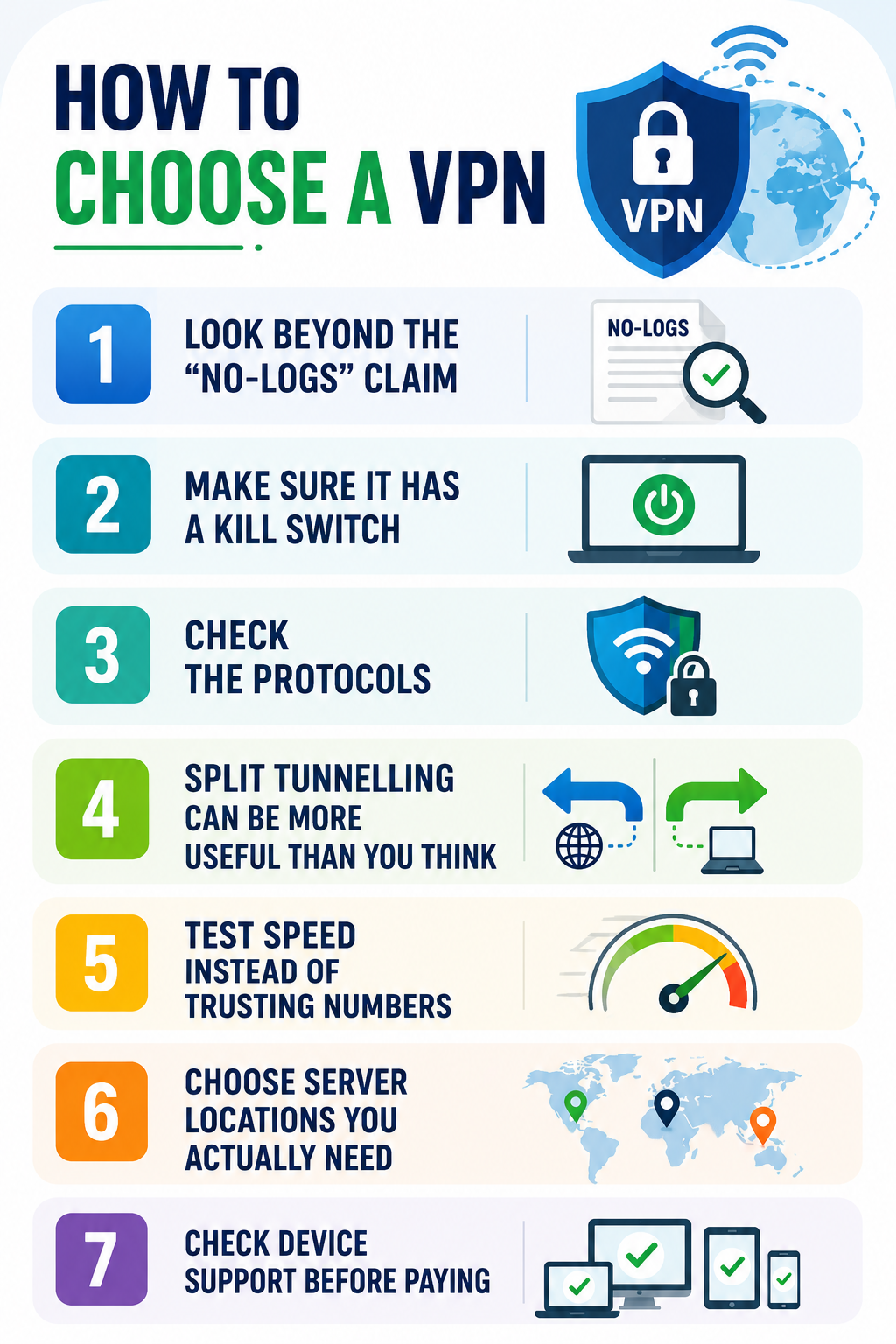
1. Look Beyond the “No-Logs” Claim
A VPN provider can potentially see information about your connection, so its data practices deserve more attention than the colour of its app or the number of countries advertised.
Do not stop at a “no-logs” badge. Read what the company actually says it stores, whether connection data is retained and whether its claims have been independently examined. ExpressVPN, for example, says its TrustedServer technology uses RAM-only servers and that its no-logs policy has been independently audited.
Practical tip: Before subscribing, search the provider’s privacy policy for terms such as activity logs, connection logs, IP address, timestamps, diagnostic data and third-party sharing. If the explanation is difficult to understand, that itself is worth considering.
2. Make Sure It Has a Kill Switch
A VPN is useful only while its protected connection is active. If that connection suddenly drops, your device could revert to its normal internet connection.
A kill switch prevents this by blocking internet traffic when the VPN disconnects. ExpressVPN calls its feature Internet Kill Switch, while Surfshark and NordVPN offer similar protection.
This is particularly useful when travelling or working from public networks.
Practical tip: Do not simply assume the feature works. After installing the VPN, enable the kill switch and test what happens when you manually disconnect the VPN. Check that your internet traffic stops rather than continuing normally.
3. Check the Protocols
VPN protocols affect how your connection balances security, speed and reliability. You do not need to understand the underlying cryptography, but you should avoid choosing a provider simply because it promises “military-grade security.”
ExpressVPN’s Lightway protocol is designed for quick connections and stable switching between networks, while NordVPN supports NordLynx alongside OpenVPN and other protocols.
Practical tip: If the VPN gives you a protocol choice, test the recommended modern protocol first. If connections become unstable, try another supported protocol rather than immediately changing providers.
4. Split Tunnelling Can Be More Useful Than You Think
Split tunnelling allows some apps to use the VPN while other traffic goes directly through your normal connection. This becomes useful when you need a VPN for work but still want local services to operate normally.
ExpressVPN’s split tunnelling, for example, can allow selected applications to use the VPN while devices such as printers and local network services remain accessible. Surfshark offers a similar feature called Bypasser.
Practical tip: If your work software requires a VPN but your banking app or smart-home devices behave strangely while it is active, try split tunnelling before disabling the VPN completely.
5. Test Speed Instead of Trusting Numbers
A VPN inevitably adds another step between your device and the destination website. The impact can vary according to your location, server load, protocol and distance from the selected server.
A provider claiming to have thousands of servers does not automatically mean it will be faster for you.
Practical tip: Test a VPN from your normal location at different times of day. Try a video call, a large download and an ordinary browsing session. Real-world performance tells you more than a promotional speed figure.
6. Choose Server Locations You Actually Need
Server coverage matters, but only in relation to your own routine. If you regularly travel between India, Europe and Southeast Asia, those locations matter more than having hundreds of additional countries you will never use.
Surfshark advertises more than 4,500 servers, while NordVPN’s network covers a large number of locations worldwide.
Practical tip: Make a list of five countries you genuinely expect to connect from or to. Check whether the provider has suitable locations there before comparing headline server numbers.
7. Check Device Support Before Paying
A VPN subscription is not particularly useful if it works well on your laptop but creates problems on your phone, tablet or smart TV.
Consider the devices you actually use. ExpressVPN, Surfshark and NordVPN support multiple major platforms, but specific features can differ between operating systems.
Practical tip: Check whether the exact feature you want, such as split tunnelling or a kill switch, is available on your operating system. Do not assume that a feature advertised on the provider’s homepage works identically everywhere.
Five Features That Shouldn’t Decide Your Purchase
Not every extra feature is useless, but these should not outweigh privacy, security and reliability when you’re comparing providers.
- Huge server count: More servers do not necessarily mean better speed or reliability.
- Dedicated IP: Useful for specific business needs, but unnecessary for most everyday users.
- Built-in extras: Antivirus, storage and other add-ons can be convenient but are not essential VPN features.
- Unusual location tools: Features such as GPS spoofing are helpful only for particular use cases.
- “Complete anonymity” claims: A VPN can improve privacy, but it cannot make you completely anonymous online.
A dedicated IP, for example, can be useful for business systems that repeatedly check your IP address, but it is unnecessary for ordinary browsing. Surfshark and ExpressVPN both offer dedicated or static IP options for specialised use cases.
Likewise, bundled antivirus, password managers or cloud storage can be convenient, but do not pay extra for them if you already use separate tools you prefer.
How to Choose a VPN Based on Your Situation
The most useful way to think about how to choose a VPN is to start with the situation rather than the brand.
| Your Situation | Prioritise |
|---|---|
| Frequent traveller | Kill switch, speed, server coverage |
| Remote worker | Split tunnelling, reliability, dedicated IP |
| Public Wi-Fi user | Encryption, leak protection, kill switch |
| Privacy-focused user | No-logs evidence, audits, secure protocols |
| Streaming user | Speed, nearby servers, stable connections |
| Occasional home user | Simplicity, price and basic protection |
If you are comparing ExpressVPN, Surfshark and NordVPN, do not ask which one is universally “best.” Ask which one fits your devices, locations, budget and privacy requirements.
For example, ExpressVPN’s Lightway and split tunnelling make it interesting for people who move between networks and need flexible routing. Surfshark’s Bypasser, NoBorders and kill switch can appeal to users who want more control over which traffic goes through the VPN. NordVPN offers multiple protocols, DNS leak protection, and an automatic kill switch alongside its broader security features.
Practical VPN Buying Checklist
Before entering your payment details, spend five minutes checking these points:
- Read the complete privacy policy, not just the homepage.
- Confirm the kill switch works on your device.
- Check available server locations for your regular destinations.
- Test speeds during your normal usage.
- Check whether split tunnelling is supported on your operating system.
- Review the renewal price rather than only the introductory offer.
- Check the refund or trial conditions before subscribing.
- Avoid providers promising complete online anonymity.
This is where how to choose a VPN becomes much easier. You do not need every feature. You need the handful that solve your actual problems without introducing unnecessary cost or complexity.
Frequently Asked Questions on How to Choose a VPN
1. Is a more expensive VPN automatically better?
No. Price does not guarantee better privacy or performance. Compare logging practices, security features, speed, device support and independent verification before considering the subscription cost.
2. Do I need a dedicated IP?
Usually not. It becomes useful when a business service, remote-access system or other application benefits from a consistent IP address.
3. Is a VPN enough to protect my device?
No. A VPN protects network traffic, but it does not replace software updates, strong passwords, multifactor authentication, backups or protection against phishing and malware.
Ultimately, choosing a VPN is not about finding the provider with the most impressive feature page. It is about identifying the risks you actually face and paying for features that address them. For most users, privacy practices, a reliable kill switch, modern protocols, leak protection, useful server locations and consistent speed matter far more than a giant server counter or a bundle of unrelated extras.