

Digital Contract Workflow for Freelancers: Templates to Signature
A freelance project can begin with a promising conversation and still run into trouble before the first payment arrives. The client may misunderstand the scope, request additional work, delay approval or disagree about payment terms. A properly managed contract prevents many of these problems, but creating, sending, chasing and storing agreements manually can become another administrative burden. According to an Adobe survey of more than 1,000 American freelancers, small businesses and solopreneurs, nearly one in four freelancers had difficulty getting a client to sign a contract. This makes a reliable digital contract workflow for freelancers more than a convenience: it is a practical way to establish expectations, document consent and start projects professionally.
Why Freelancers Need a Digital Contract Workflow
Freelancers often work with multiple clients, different project timelines and varying payment arrangements. A graphic designer may need milestone-based payments, while a content writer may charge per article and a developer may work on a monthly retainer.
Using email conversations as the only record of these arrangements creates room for confusion. A digital workflow brings the important details into one agreement and makes it easier to track whether the client has reviewed and signed it.
It also creates a professional experience. Clients receive a clear document, can review it remotely and sign without printing, scanning or couriering paperwork.
Build a Contract Template Before Sending Anything
The biggest time-saving step is to create reusable templates for the services you offer. Instead of drafting every agreement from a blank page, prepare a master document and customise the relevant fields for each client.
A useful freelance contract should cover:
- Parties involved: Full legal names, business names, addresses and contact details.
- Scope of work: Specific deliverables, quantities, formats and services included.
- Timeline: Project start date, milestones, delivery dates and client approval deadlines.
- Payment terms: Total fee, advance, milestone payments, currency, taxes and late-payment provisions.
- Revisions: Number of revisions included and charges for additional changes.
- Intellectual property: Who owns the final work, when ownership transfers and whether portfolio usage is permitted.
- Confidentiality: How client information, credentials and business data will be handled.
- Termination: Notice periods, cancellation charges and payment for completed work.
- Dispute resolution: Applicable law, jurisdiction and the agreed process for resolving disagreements.
Avoid vague statements such as “social media management for one month.” Specify the number of posts, platforms, content formats, approval process and reporting requirements. The more measurable the deliverables, the fewer disagreements you are likely to face.
Which Contract Templates Should Freelancers Maintain?
Different services require different commercial terms. A single generic agreement may not cover every situation.
| Contract template | Best suited for | Important details |
|---|---|---|
| Freelance service agreement | General client projects | Scope, fees, timeline and termination |
| Web development agreement | Developers and designers | Technical specifications, testing and ownership |
| Content writing agreement | Writers and editors | Word count, revisions and publication rights |
| Retainer agreement | Ongoing monthly services | Monthly deliverables, payment and renewal |
| NDA | Confidential projects | Confidential information and permitted use |
| Project change order | Additional client requests | New scope, cost and revised deadline |
Keep a master version of each document. When a client requests additional work, use a change order rather than relying on a casual message to redefine the original agreement.
The Digital Contract Workflow: From Client Brief to Signature
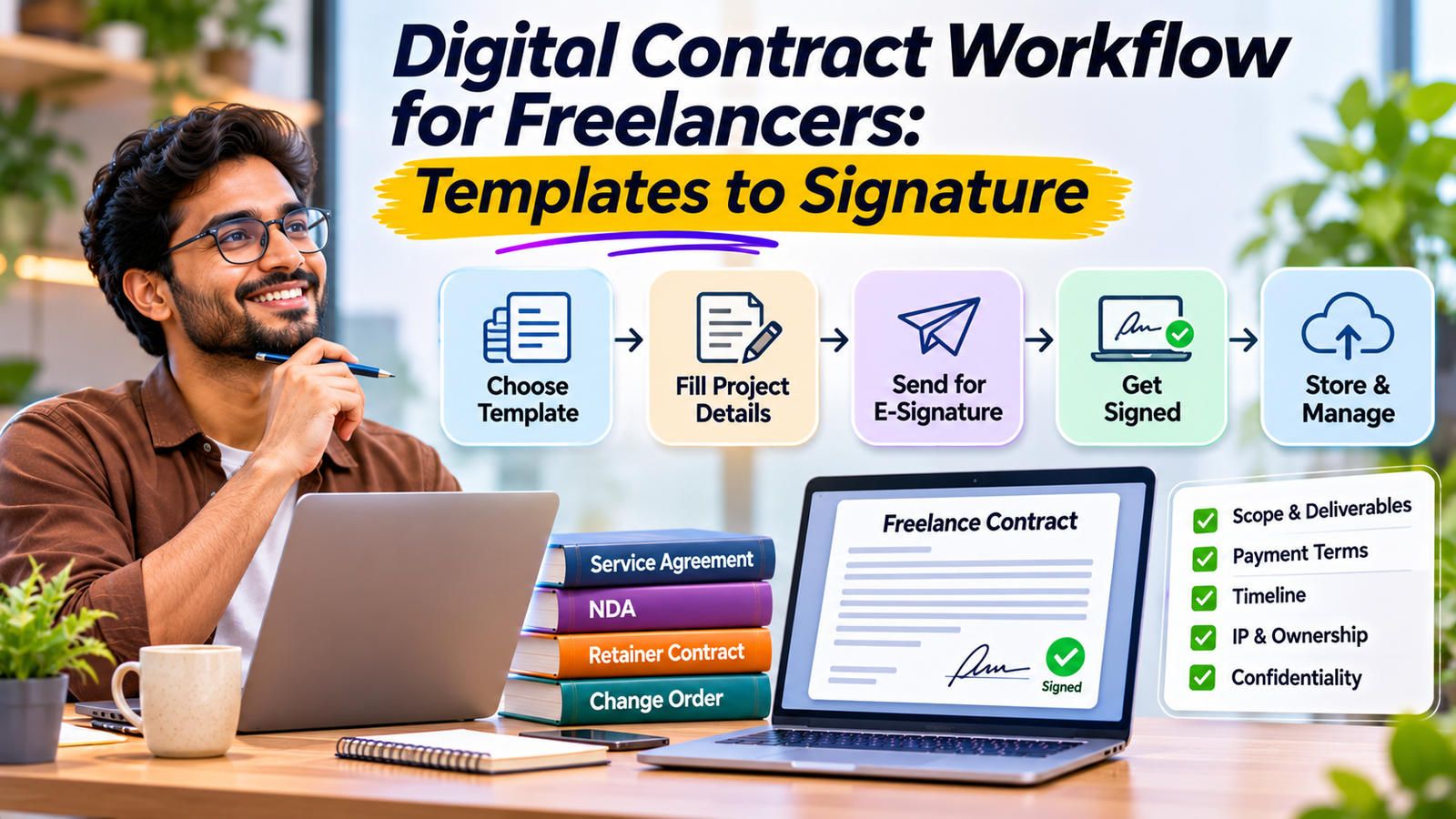
A practical digital contract workflow for freelancers can be organised into five stages.
1. Collect client information
Once a project is approved commercially, collect the client’s legal name, billing address, business details, contact information and project requirements. Confirm whether the agreement is being signed by an individual or an authorised business representative.
2. Generate the agreement
Choose the relevant template and fill in project-specific details. Tools such as Google Docs and Microsoft Word are useful for preparing contracts. Use clearly marked fields for names, fees, dates, deliverables and signatures.
3. Send it for electronic signature
Upload the final document to an electronic signature platform. Tools such as Adobe Acrobat Sign, DocuSign, Dropbox Sign and Zoho Sign support digital document signing workflows. Depending on the service, you can assign signing fields, specify the signing order and request authentication.
4. Track signing and follow up
Check whether the client has opened, reviewed and signed the document. If the agreement remains pending, send a polite reminder. Avoid starting substantial work simply because the client has verbally approved the proposal.
5. Store the signed agreement
Download the completed agreement, signature certificate and available audit trail. Save them in a dedicated client folder with a consistent naming format, such as:
ClientName_ProjectName_Contract_2026.pdf
Keep the signed version separate from editable drafts. Restrict access to authorised people and maintain backups.
Choosing the Right Electronic Signature Tool
The right platform depends on your project volume, budget, authentication requirements and client location.
- Adobe Acrobat Sign: Useful for PDF-based agreements and document workflows.
- DocuSign: Offers signing workflows, signer tracking and document management features.
- Dropbox Sign: Suitable for straightforward signature requests and reusable templates.
- Zoho Sign: Worth considering if you already use other Zoho business applications.
Compare pricing, document limits, identity verification, audit records, integrations and data retention policies before subscribing. A free or entry-level plan may be enough for a freelancer handling a few contracts each month.
Are Digitally Signed Freelance Contracts Legally Valid?
Electronic signatures are legally recognised in many jurisdictions, but the requirements depend on the country, document type and signature method.
In India, the Information Technology Act, 2000 provides legal recognition to electronic records and electronic signatures. Section 5 addresses the legal recognition of electronic signatures, while Section 10A recognises contracts formed through electronic means. However, certain documents are excluded from the Act’s electronic-signature framework, so not every agreement can automatically be signed using any method.
In the European Union, the eIDAS framework recognises simple, advanced and qualified electronic signatures. A qualified electronic signature has the equivalent legal effect of a handwritten signature across EU Member States.
For cross-border freelance work, specify the governing law and jurisdiction in the contract. For high-value projects, regulated transactions or agreements involving unusual intellectual property arrangements, seek legal advice before using a standard template.
Make Contract Management Part of Your Business Routine
An effective digital contract workflow for freelancers should not end when the client signs. Link the agreement to your invoicing and project management process. Record payment dates, renewal deadlines, outstanding approvals and any changes to the original scope.
Review your templates periodically, especially when your services, pricing or business arrangements change. This small administrative habit can prevent costly misunderstandings later.
The objective is simple: spend less time chasing paperwork and more time doing the work clients hire you for. A well-organised digital contract workflow for freelancers makes that possible while giving both parties a clear record of what they agreed to.
Frequently Asked Questions
1. Can freelancers create contracts without hiring a lawyer?
Yes. Freelancers can prepare standard agreements using reusable templates. However, a lawyer should review complex, high-value or legally sensitive contracts.
2. Which is the best electronic signature tool for freelancers?
Adobe Acrobat Sign, DocuSign, Dropbox Sign and Zoho Sign are popular options. The best choice depends on your budget, signing volume and authentication requirements.
3. What should a freelance contract include?
It should cover the scope of work, deliverables, payment terms, deadlines, revisions, intellectual property, confidentiality and termination conditions.
Also Read: How to Add Online Certificates to Your LinkedIn (and Make Them Count)