
USB-C Explained: Cables, Wattages, and What Your Devices Actually Need
by parth@bidkinetic.com | Aug 18, 2026 | Gadgets
USB-C has become the default connector for phones, tablets, laptops, monitors, power banks and accessories, but the small oval-shaped port tells you surprisingly little about what a device can actually do. A USB-C connection can carry basic USB 2.0 data or support USB4 at up to 80 Gbps, while USB Power Delivery can provide as much as 240W with the right charger, device and cable. The USB Implementers Forum (USB-IF) has also introduced clearer 60W and 240W power markings for compliant USB-C-to-USB-C cables.
That is why buying a cable based only on the words “USB-C” can lead to disappointing charging speeds, slow file transfers or a monitor that refuses to work. The connector is only the starting point.
USB-C Is a Connector, Not a Speed Rating
This is the first distinction worth remembering.
USB-C describes the physical connector and port design. It does not automatically mean USB 3.2, USB4, fast charging or video output.
Two cables can look identical but have completely different capabilities. One may support only USB 2.0 data speeds, while another can handle high-speed data, displays and high-power charging.
USB-IF’s current specifications continue to expand the capabilities associated with USB-C, including USB4 Version 2.0 and newer Type-C specifications.
The Three Things You Need to Check
When choosing a cable, separate its capabilities into three categories:
- Power: How many watts can it safely carry?
- Data: How quickly can it transfer files?
- Video: Can it support the display standard and resolution you need?
A cable can be excellent in one category and mediocre in another. A 100W-rated cable, for example, does not automatically provide high-speed data transfer.
How Much Wattage Do You Actually Need?
USB Power Delivery allows a charger and device to negotiate the amount of power required rather than simply forcing the maximum available wattage into the device. USB-IF says PD can support up to 240W using compatible USB-C equipment.
That does not mean every device needs a 240W charger.
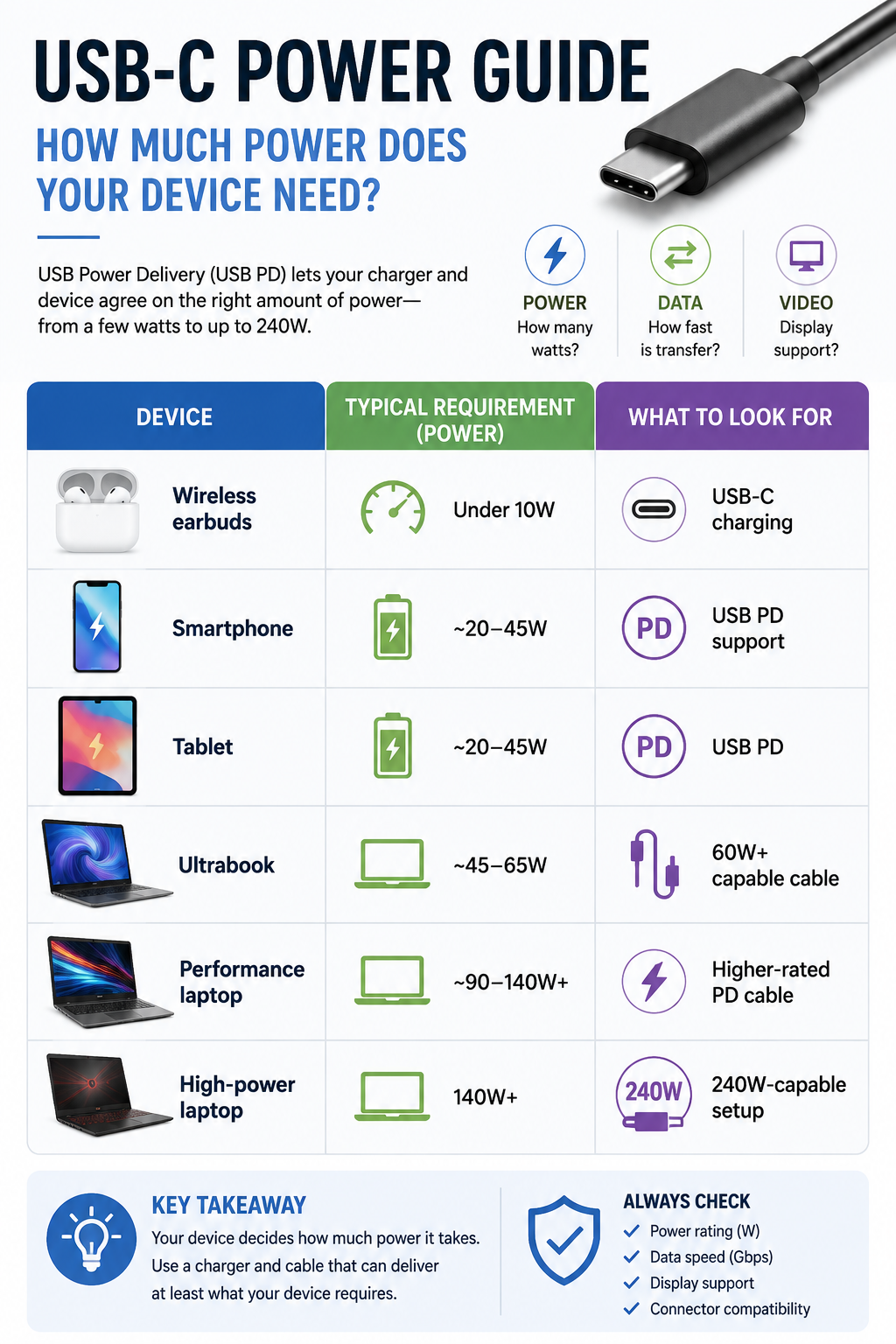
These are practical ranges rather than universal specifications. Always check the manufacturer’s stated charging requirement before buying.
A 240W charger will not make a phone charge at 240W if the phone is designed to accept considerably less. The device determines what it requests through the charging protocol.
Why Cable Wattage Matters
The charger is only one part of the system.
- Imagine you have a 100W laptop charger but connect it through a cable that cannot support the required power. The setup cannot deliver the charger’s full capability.
- USB-IF’s current cable marking system uses 60W and 240W power icons for compliant USB-C-to-USB-C cables, making it easier to identify certified power capabilities.
- For higher-power laptops, check the cable rating rather than assuming every USB-C cable is interchangeable.
Don’t Ignore Data Speed
Charging is only half of the USB-C story.
A cheap cable may charge your phone perfectly but become painfully slow when you use it to move large video files to an SSD. This happens because power capability and data capability are separate specifications.
USB4 can reach 80 Gbps with certified 80 Gbps cables, while also supporting multiple data and display protocols. It is also designed to work with earlier USB standards and compatible Thunderbolt 3 systems.
For everyday charging and occasional file transfers, USB 2.0 may be perfectly adequate. For external SSDs, docks, professional cameras or large media libraries, paying attention to data speed becomes much more important.
What About Monitor Connections?
A USB-C port can also carry display signals, but again, the connector itself does not guarantee video output.
If you want to connect a laptop to a monitor through USB-C, check whether the laptop’s port supports the required display function and whether the cable, dock, and monitor support the necessary bandwidth.
This matters particularly with high-resolution or high-refresh-rate monitors. A cable that works perfectly for charging may not be suitable for a demanding display setup.
The Cable You Need Depends on the Job
For a phone charger, spending heavily on an extremely high-speed data cable may provide little practical benefit if you rarely transfer large files.
For a laptop dock, the opposite can be true. You may need substantial power delivery, fast data and display support from the same connection.
This is where USB-C becomes confusing: the most expensive cable is not necessarily the best cable for your device. The right cable is the one whose power, data and display capabilities match the hardware on both ends.
Practical Buying Tips
Before purchasing a replacement cable, check the specifications of your device and charger first. If the laptop requires 100W, choose a cable rated for at least that requirement rather than assuming a generic cable will work.
For fast external storage, check the advertised data rate. For monitors, verify display compatibility separately.
Also look for USB-IF certification and the appropriate power/data markings where available. USB-IF requires compliant USB-C-to-USB-C cables to carry specified power markings, while applicable high-speed cables also identify their supported data rate.
One more practical rule: avoid suspiciously cheap cables from unknown sellers when you need high power or high-speed data. A cable is inexpensive compared with a laptop, SSD or charger that could be affected by poor-quality hardware.
Common Mistakes
The biggest mistake is assuming every USB-C cable is identical. Another is buying a 240W charger when the device cannot use anything close to that power.
People also frequently confuse watts with gigabits per second. Watts describe electrical power; Gbps describes data-transfer bandwidth. They measure completely different things.
Finally, don’t judge a cable by thickness alone. Build quality matters, but performance depends on its actual specifications and compliance.
Frequently Asked Questions
1. Is every USB-C cable fast?
No. USB-C cables can support very different data rates. Some are limited to USB 2.0, while others support much faster USB 3.x or USB4 connections.
2. Does a higher-wattage charger charge every device faster?
No. The device negotiates the power it can accept. A higher-rated charger provides additional capacity but does not force the device to take more power.
3. Why does my USB-C cable charge quickly but transfer files slowly?
Charging and data performance are separate. Your cable may support high power while using a slower data specification.
Ultimately, USB-C is best understood as a flexible connection standard rather than a guarantee of performance. Once you separate charging power, data speed and display capability, choosing the right cable becomes considerably less confusing.