

Desk Job Damage Control: Fixing Posture Without a Physio
Eight hours at a desk can leave your neck stiff, shoulders rounded, and lower back feeling uncomfortable, even if you exercise occasionally. The problem is not simply sitting with a bent back; it is spending too much time in the same position without enough movement. According to the World Health Organization, around 1.71 billion people worldwide live with musculoskeletal conditions, making these problems a major contributor to disability. Office workers are particularly familiar with neck, shoulder and back discomfort associated with prolonged computer use and poorly arranged workstations. The good news is that improving everyday posture does not always require expensive equipment or frequent appointments. A few adjustments to your chair, screen and keyboard, combined with regular movement and simple strengthening exercises, can make your workday more comfortable. Fixing posture without a physio starts with understanding what is putting unnecessary strain on your body and changing the habits that keep repeating it.
Why Desk Work Affects Your Posture
When you work at a computer, it is easy to lean towards the screen, push your head forward or allow your shoulders to roll inwards. Over time, these positions can increase the load on your neck and upper back. Sitting for long periods can also reduce movement around the hips and make your lower back feel stiff.
There is no single perfect posture that you must maintain all day. Even a well-arranged workstation can become uncomfortable if you remain still for hours. The better approach is to maintain a comfortable, supported position and change it regularly.
Start With Your Workstation Setup
Before buying a posture corrector or ergonomic chair, check how your existing workstation is arranged. Small changes can make a noticeable difference.
| Workstation element | Recommended adjustment |
|---|---|
| Monitor | Position the top of the screen around eye level |
| Chair | Support your lower back and keep feet flat on the floor |
| Knees | Keep them roughly level with or slightly below your hips |
| Keyboard | Keep it close enough to avoid reaching forward |
| Mouse | Place it beside the keyboard to reduce shoulder stretching |
| Elbows | Keep them close to your body, around a right angle |
| Lighting | Reduce glare so you do not lean towards the screen |
If your feet do not reach the floor comfortably, use a footrest or a stable support. Laptop users should consider a separate keyboard and mouse if they work at the same desk for extended periods. A laptop screen placed too low often encourages the head to tilt forward.
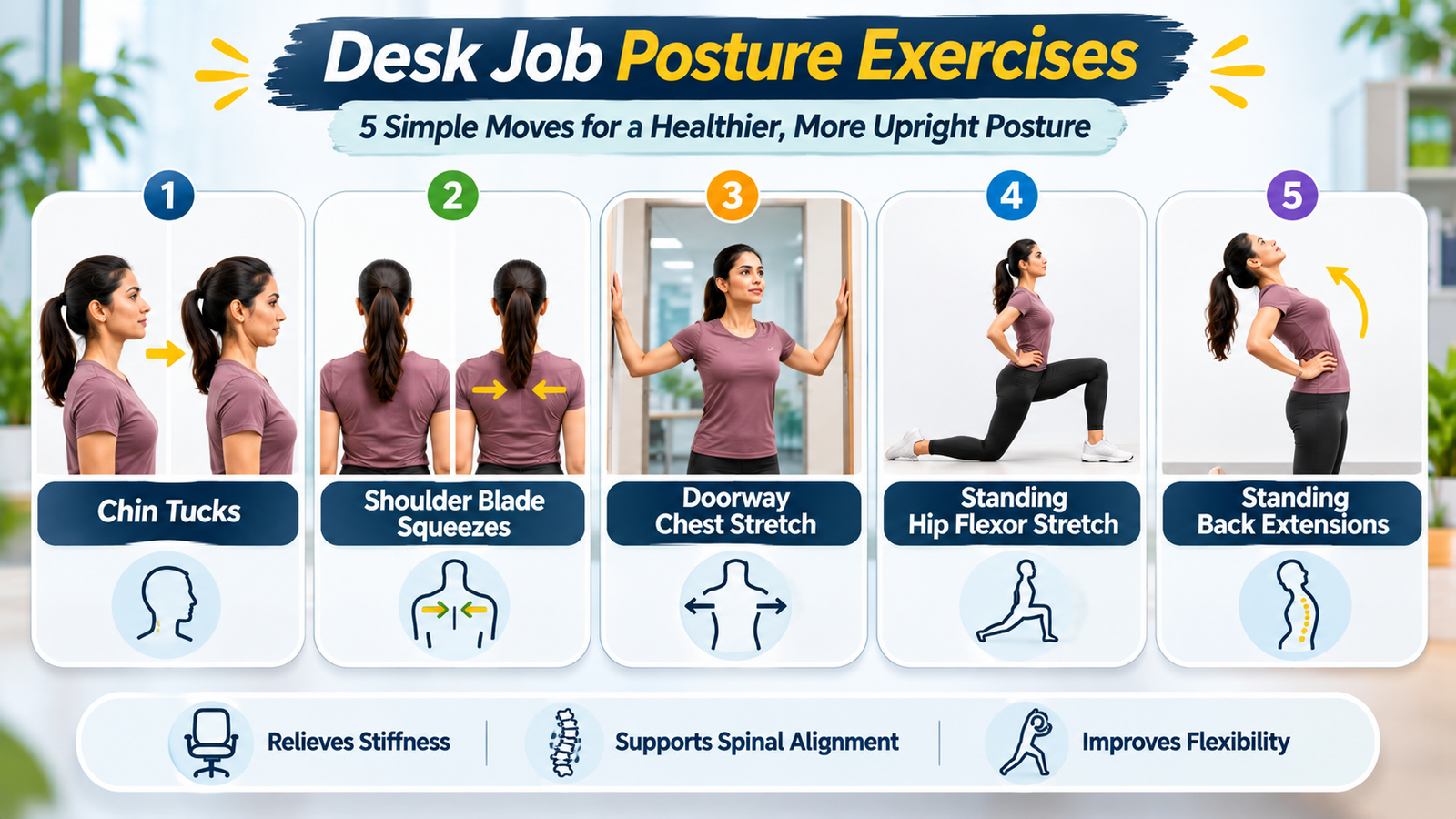
Five Simple Exercises for Fixing Posture Without a Physio
You do not need a gym session to move the areas that become stiff during desk work. Try these movements during breaks, staying within a comfortable range and avoiding anything that causes sharp pain.
1. Chin Tucks: For Forward Head Posture
Looking down at a laptop or phone for extended periods can encourage your head to move forward. Chin tucks help you practise bringing your head back into a neutral position.
- Sit upright and look straight ahead.
- Gently draw your chin backwards, as if making a double chin.
- Hold for 3-5 seconds and release.
- Repeat 8-10 times.
- Avoid tilting your head down or forcing the movement.
2. Shoulder Blade Squeezes: For Rounded Shoulders
When typing, your shoulders may gradually move forward. This exercise encourages better control of the muscles around your upper back.
- Sit or stand with your arms relaxed.
- Gently draw your shoulder blades towards each other.
- Hold for 5 seconds without lifting your shoulders.
- Repeat 10-12 times.
3. Doorway Chest Stretch: To Reduce Chest Tightness
Working with your arms in front of your body for hours can leave your chest feeling tight.
- Stand in a doorway and place your forearms against the frame.
- Step one foot forward gently.
- Lean slightly until you feel a comfortable stretch across your chest.
- Hold for 20-30 seconds.
Do not force the stretch or continue if it causes shoulder pain.
4. Standing Hip Flexor Stretch: For Tight Hips
Long periods of sitting keep your hips bent for much of the day. A gentle hip flexor stretch can help improve comfort and mobility.
- Step one foot forward into a short lunge.
- Keep your upper body upright.
- Gently move your hips forward until you feel a stretch at the front of the back leg.
- Hold for 20-30 seconds on each side.
5. Standing Back Extensions: After Long Sitting Sessions
If your lower back feels stiff after sitting, try a gentle standing extension.
- Stand with your feet hip-width apart.
- Place your hands on your hips.
- Gently lean backwards within a comfortable range.
- Return to an upright position and repeat 5-8 times.
Stop if the movement increases pain or causes symptoms to travel down your leg.
How Often Should You Take Movement Breaks?
Waiting until your back hurts is not the best strategy. Build movement into your workday before discomfort becomes a regular problem. A practical approach is to stand, walk or change positions every 30-60 minutes. Even a short walk to refill your water bottle or a few shoulder movements between meetings can help interrupt prolonged sitting.
Try this simple workday schedule:
| When | What to do | Time |
|---|---|---|
| Starting work | Adjust chair, screen and keyboard | 2 minutes |
| Every 30-60 minutes | Stand, walk or change position | 2-3 minutes |
| Mid-morning | Chin tucks and shoulder blade squeezes | 2 minutes |
| Lunch break | Walk or perform gentle mobility exercises | 5-10 minutes |
| Mid-afternoon | Chest and hip flexor stretches | 3-5 minutes |
| End of day | Take a short walk | 5-10 minutes |
The goal is not to follow a rigid timetable. Choose reminders that fit your workload and make movement a normal part of your routine.
Do Posture Correctors and Ergonomic Gadgets Actually Help?
Posture correctors, lumbar cushions, standing desks and ergonomic chairs are frequently marketed as quick solutions. Some can improve comfort, but none automatically fixes posture.
A lumbar cushion may provide additional lower-back support if your chair lacks it. A laptop stand can help raise the screen, while an external keyboard and mouse allow your arms to remain in a more comfortable position. A height-adjustable desk can make it easier to alternate between sitting and standing.
However, avoid relying on posture braces throughout the day without professional guidance. They do not replace movement, strength or good workstation habits. Fixing posture without a physio is more about developing sustainable habits than purchasing another product.
When Should You See a Physiotherapist?
Not every episode of desk-related stiffness requires professional treatment. However, persistent or worsening discomfort should not be dismissed as poor posture.
Seek medical advice if you experience:
- Pain that continues despite changing your workstation and activity habits.
- Tingling, numbness or weakness in your arms or legs.
- Pain that travels from your back into your legs.
- Significant discomfort that interferes with sleep or everyday activities.
- Pain following an injury.
Sudden severe weakness, loss of bladder or bowel control, or numbness around the groin requires urgent medical assessment. Self-care exercises are not a substitute for diagnosing an underlying condition.
Make Your Desk Workday Easier on Your Body
Good posture is not about keeping your back perfectly straight from morning to evening. It is about arranging your workspace comfortably, moving regularly and avoiding positions that repeatedly cause discomfort. Start with your screen and chair, introduce a few simple exercises and take short breaks between tasks. Consistently fixing posture without a physio can make desk work more comfortable, but remember that pain is not something you should simply learn to tolerate.
FAQs About Fixing Posture Without a Physio
1. Can I correct poor posture without visiting a physiotherapist?
You can improve everyday positioning through workstation adjustments, regular movement and gentle exercises. However, persistent pain or neurological symptoms should be assessed by a healthcare professional.
2. How long does it take to improve desk posture?
There is no fixed timeline. Comfort and movement habits may improve with consistent practice, but results depend on your starting point, daily routine and whether an underlying condition is present.
3. Is sitting straight all day good for your back?
No. Maintaining one rigid position for hours can also cause discomfort. A comfortable, supported posture combined with frequent position changes is a better approach.
Also Read: Sleep and Exercise: How Training Time Affects Your Rest