by parth@bidkinetic.com | Oct 3, 2026 | Tech
Remote work is no longer a niche arrangement. Stanford’s WFH Research data indicates that work from home accounted for roughly 25% of paid workdays in the U.S. in early 2026, compared with about 7% before the pandemic. At the same time, AI is becoming part of ordinary work rather than a separate experiment: the U.S. Census Bureau reported that 56% of workers had used AI for at least one work task in its March 2026 survey, with writing, information search, idea generation and summarization among the most common uses. That makes choosing the right AI productivity tools for remote workers less about collecting as many subscriptions as possible and more about removing specific sources of friction: too many meetings, scattered information, repetitive admin, overflowing inboxes, difficult scheduling and constant context switching.
Gallup’s 2026 research found that 65% of employees in organizations using AI said it had a positive effect on productivity and efficiency, although the reported benefit varied considerably depending on how broadly employees used AI.
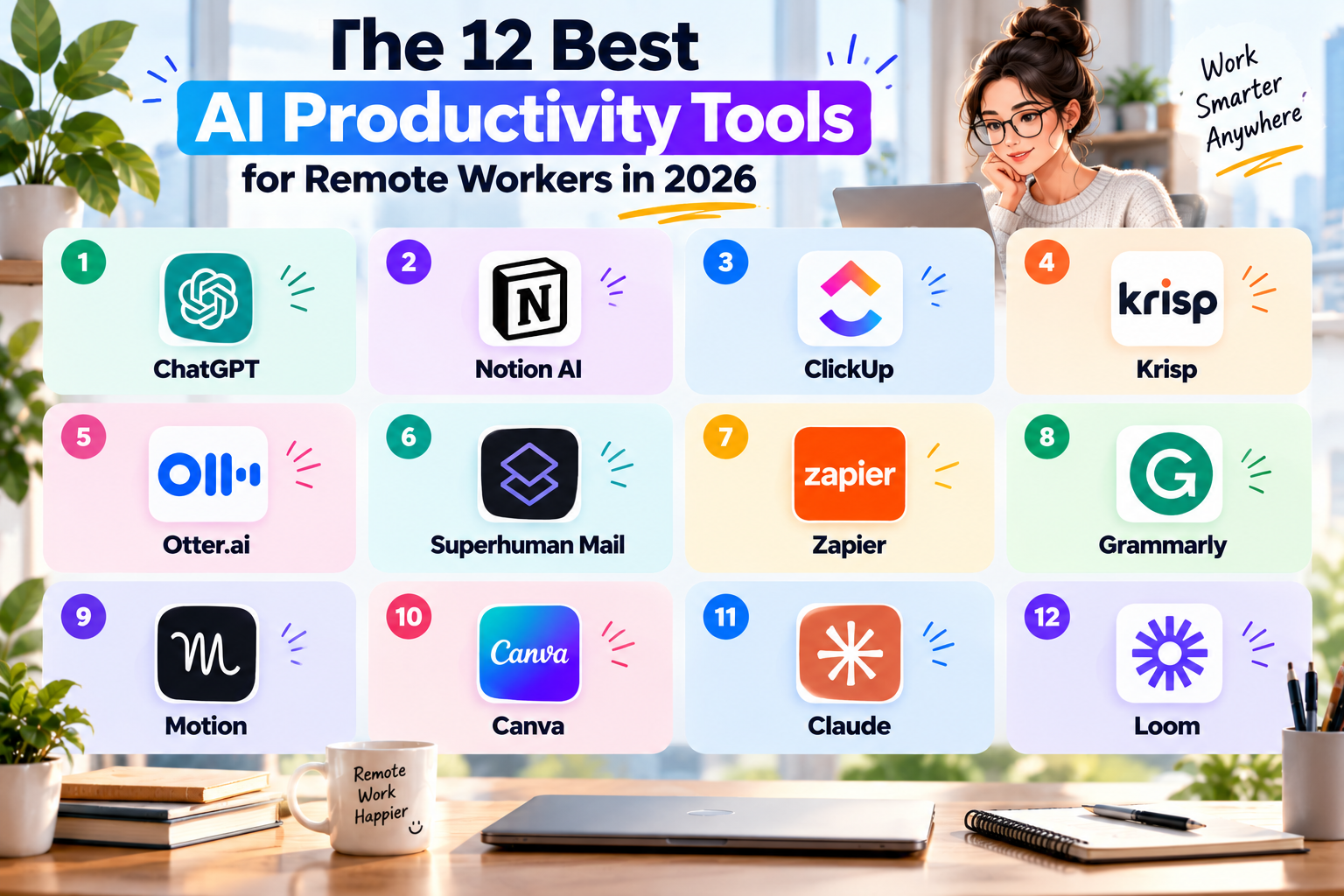
The following 12 tools cover different parts of the remote workday, rather than offering twelve variations of the same chatbot.
1. ChatGPT: General-Purpose AI Work Assistant
For remote professionals who need one flexible AI assistant, ChatGPT covers an unusually broad range of tasks. It can help draft emails and documents, summarize material, analyze uploaded files and data, research topics and assist with coding.
Its usefulness comes from being adaptable. A marketing manager might use it for campaign research in the morning, spreadsheet analysis after lunch and proposal drafting later in the day.
Best for: Research, writing, analysis, brainstorming and general knowledge work.
2. Notion AI: Knowledge and Documentation
Remote teams often struggle with information being spread across documents, meeting notes and project pages. Notion combines those elements in one workspace, with AI features for searching, summarizing and working with the information stored there.
Its value is particularly apparent for distributed teams where employees cannot simply walk over to someone’s desk and ask what happened.
Best for: Team knowledge bases, documentation, project notes and internal information.
3. ClickUp: AI Project Management
ClickUp combines tasks, documents, project management and AI features. Its AI tools can help summarize tasks, create or refine content and generate updates from project information.
For remote teams, that can reduce the need for manually assembling status reports. ClickUp’s current productivity guidance positions the platform around project management while emphasizing AI-assisted workflows.
Best for: Projects, task management, team coordination and status reporting.
4. Krisp: Meetings and Background Noise
Remote work doesn’t always happen in a perfectly quiet home office. Krisp provides AI-based noise cancellation for microphones and speakers and can work across different communication applications.
Its meeting assistant also provides transcription, notes and action items. That makes it useful for people who spend a large part of their day in calls and need something more than simple audio cleanup.
Best for: Noisy environments, online meetings and meeting documentation.
5. Otter.ai: Meeting Transcription
Otter is focused heavily on turning conversations into searchable information. It can record meetings, generate transcripts and create summaries and action items.
For remote employees, the practical advantage is obvious: missing a meeting doesn’t necessarily mean missing everything that was discussed.
Best for: Meeting transcripts, summaries and searchable conversation records.
Email remains one of the biggest sources of interruption for remote workers. Superhuman Mail combines a productivity-focused email interface with AI features for drafting, summarizing conversations, searching and managing follow-ups.
Superhuman currently promotes AI-assisted writing, automatic labels, reminders and conversation summaries as part of its Mail workflow.
Best for: High-volume email, follow-ups and professionals who spend substantial time in their inbox.
7. Zapier: Cross-App Automation
Zapier is useful when the problem isn’t writing or research but repetitive digital work.
It connects thousands of applications and allows events in one service to trigger actions elsewhere. A new form submission, for example, can trigger a CRM update, Slack notification and task creation without someone manually moving the information between systems.
Its AI capabilities can also help users build and manage workflows.
Best for: Automating repetitive processes between apps.
8. Grammarly: Everyday Writing Assistance
Remote work creates a huge amount of written communication: Slack messages, emails, proposals, documentation and customer responses.
Grammarly works across many places where people write, providing grammar, clarity, tone and AI-assisted rewriting. This makes it less about generating entire documents and more about improving communication at the point where writing happens.
Best for: Emails, business writing, editing and communication.
9. Motion: AI Scheduling
Calendar overload is particularly frustrating when working remotely because meetings can consume the time needed to actually complete the work.
Motion approaches this through AI scheduling. It combines tasks and calendar commitments and automatically plans work around available time. The attraction is not simply having another calendar. It is reducing the manual process of deciding when each task should be done.
Best for: Task scheduling, time management and meeting-heavy workdays.
10. Canva: AI-Assisted Visual Work
Remote employees increasingly create their own presentations, social graphics, internal communications and marketing materials.
Canva combines design templates with AI-powered tools that can assist with generating and editing visual content. For people who aren’t professional designers, it can shorten the distance between an idea and a usable visual asset.
Best for: Presentations, social graphics, marketing content and visual communication.
11. Claude: Long-Form Analysis and Writing
Claude is another general-purpose AI assistant, but it is particularly useful for people working with substantial amounts of text.
Remote professionals can use it for document analysis, research, drafting, editing and reasoning-heavy tasks. It can fit well into workflows where the challenge is understanding a large amount of information rather than simply generating a short response.
Best for: Long documents, research, writing and analytical work.
12. Loom: Async Video Communication
Not every question deserves a 30-minute meeting.
Loom lets remote employees record short videos to explain processes, demonstrate software, provide feedback or communicate updates. Its AI features can help summarize and organize recorded content. This fits an important remote-work principle: use recorded communication when real-time discussion isn’t necessary.
Best for: Async updates, tutorials, product demonstrations and screen recordings.
Comparing the 12 AI Productivity Tools for Remote Workers
| Tool |
Main purpose |
Particularly useful for |
AI role |
| ChatGPT |
General AI |
Research, writing, analysis |
Core assistant |
| Notion AI |
Knowledge management |
Documentation and team knowledge |
Search, summarize, create |
| ClickUp |
Project management |
Tasks and projects |
Summaries, writing, updates |
| Krisp |
Meetings |
Calls and noisy environments |
Noise cancellation, notes |
| Otter.ai |
Transcription |
Meetings |
Transcripts and summaries |
| Superhuman Mail |
Email |
Inbox-heavy roles |
Drafting, summaries, follow-ups |
| Zapier |
Automation |
Repetitive workflows |
Workflow creation |
| Grammarly |
Writing |
Emails and documents |
Editing and rewriting |
| Motion |
Scheduling |
Calendar-heavy workers |
Automatic scheduling |
| Canva |
Design |
Visual content |
Design and content generation |
| Claude |
AI assistant |
Long documents and analysis |
Reasoning and writing |
| Loom |
Async video |
Remote communication |
Summaries and organization |
FAQs
1. Which AI productivity tools are useful for remote workers?
It depends on the workflow. ChatGPT and Claude cover general knowledge work, while Notion and ClickUp focus on organization, Otter and Krisp on meetings, Zapier on automation, and Motion on scheduling.
2. Do remote workers need multiple AI tools?
Not necessarily. A small, well-connected collection is usually more practical than maintaining numerous overlapping subscriptions.
3. Are free AI productivity tools enough?
For many individuals, yes. Free versions can be useful for testing a workflow before committing to a subscription. Paid plans generally become more relevant when higher usage limits, advanced integrations, team administration or specialized features are required.

by parth@bidkinetic.com | Oct 2, 2026 | Travel
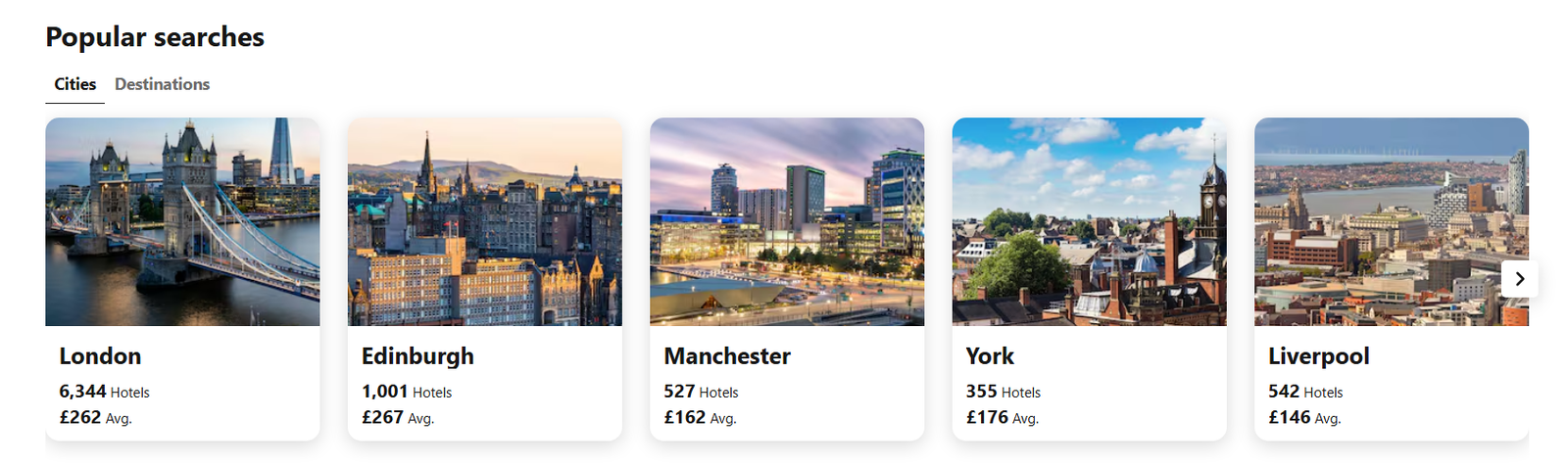
Finding a genuinely cheap hotel is not simply a matter of typing a destination into Google and clicking the first £80-per-night result. Hotel prices can differ significantly between booking sites, even for the same property and dates. That is where Trivago UK becomes useful: the platform currently compares hotel prices from hundreds of booking sites and displays different offers side by side. Its UK homepage currently lists more than 6,300 hotels for London, around 1,000 for Edinburgh and more than 500 each for Manchester, York and Liverpool.
The displayed average prices also vary considerably: London is currently around £263 per night, compared with roughly £82 for Blackpool, showing why destination and timing can matter as much as the hotel itself. (September 2026)
The important point is that the lowest price shown on a comparison page is not automatically the cheapest booking once cancellation terms, breakfast, room type and other conditions are considered. Getting the best deal requires a little more than sorting by price.
Start With Flexible Dates
The biggest saving opportunity often comes before choosing a hotel.
Enter your destination on Trivago UK, then look at nearby dates if your trip is flexible. Trivago currently displays indicative monthly price ranges for destinations, based on average prices for three-star hotels. For example, its current London data shows materially different average ranges across the year, with some winter months starting considerably lower than summer periods.
A one-day shift can sometimes change the available inventory and therefore the price. Sunday-to-Thursday stays can also behave differently from Friday and Saturday nights, particularly in cities with strong weekend demand.
For a flexible trip, compare:
- One day earlier and later
- A different weekend
- Midweek versus weekend
- One-week versus two-week date windows
- Nearby destinations or neighbourhoods
Don’t assume that the first dates entered are the cheapest ones.
Sort by Price, Then Filter Properly
Source: Trivago (September 2026)
Once the results appear, use the price ascending option rather than relying on the default order. Trivago hotel results also provide filters such as rating, location, breakfast included, parking, pool, free cancellation, Wi-Fi and accommodation type.
This matters because the absolute cheapest room may not actually meet your requirements.
For example, a £78 room without breakfast may cost more overall than a £88 room that includes breakfast for two. Likewise, a £75 hotel several miles outside the centre may require £15-£25 per day in transport.
A useful approach is to establish your actual requirements first:
| Requirement |
What to check |
| Maximum price |
Set a realistic nightly budget |
| Location |
Distance from your main attraction or station |
| Breakfast |
Included or additional charge |
| Cancellation |
Free cancellation versus non-refundable |
| Rating |
Guest rating and number of reviews |
| Parking |
Free, paid or unavailable |
| Room type |
Standard, family, suite or apartment |
| Wi-Fi |
Included and available throughout |
| Final cost |
Compare the actual booking offer before paying |
This turns Trivago from a simple price list into a more practical comparison tool.
Don’t Chase the Cheapest Nightly Rate
This is probably the most important trick.
Suppose three booking sites show the same hotel:
- £92 per night with breakfast
- £84 per night without breakfast
- £79 per night with a non-refundable rate
The £79 result looks cheapest, but it may not be the cheapest option for your trip.
Compare the same room, same number of guests, same dates and same cancellation conditions.
This is especially important because a hotel can have several offers on the same booking site. One may include breakfast, another may be room-only, and another may have stricter cancellation conditions.
Before clicking through, check what the displayed rate actually includes.
Use Location as a Pricing Tool
One of the easiest ways to lower a hotel bill is to broaden the search area slightly.
If central London is outside your budget, for example, compare hotels close to an Underground or rail connection rather than searching only within the city centre. The same principle applies to Manchester, Edinburgh, Liverpool and other UK destinations.
Trivago provides map-based searching, allowing travellers to see properties in relation to the area they actually want to visit. Its app also supports location-based hotel searches and map exploration.
A hotel that is £20 cheaper but requires an expensive taxi every day is not necessarily a saving. Look at the combined accommodation and transport cost.
Check Member Prices and App Deals
Another saving opportunity is signing into Trivago.
The current UK site promotes member-exclusive benefits, including loyalty deals and member prices. Trivago also promotes app-exclusive deals and price-drop notifications. That means it can be worth comparing the displayed price while signed out with the price available after logging in.
The app can also be useful when a trip is not ready to book immediately. Instead of repeatedly searching manually, price notifications can help identify when an offer changes.
Don’t Ignore the Booking Site Behind the Price
Source: Trivago (September 2026)
Trivago UK is a metasearch platform rather than the hotel operator for most bookings. It compares offers from multiple booking providers and then sends the traveller to the selected provider to complete the reservation.
That final step matters.
Before payment, check:
- Whether taxes are included
- Cancellation deadlines
- Prepayment requirements
- Breakfast conditions
- Deposit requirements
- Room occupancy
- Currency and payment terms
- Whether the selected room is still available
Prices can change between the comparison result and the booking provider, particularly when inventory is limited.
It is also worth checking the hotel’s own website for the identical room and conditions. Trivago may show a lower third-party rate, but a direct hotel rate could sometimes include extras such as breakfast, flexible cancellation or loyalty benefits that change the overall value.
Pay Attention to How Results Are Ranked
Price is not the only factor determining what appears on a Trivago results page.
Trivago’s own hotel-result pages include an explanation of how payments to the company can affect ranking. That is a useful reason not to interpret the first result as the cheapest or best hotel automatically.
For a budget-focused search, deliberately switch to price ascending, then apply the filters that matter to the trip. After that, compare the actual offers rather than relying on the default ranking.
A Simple Trivago UK Price-Hunting Routine
A practical search can take only a few minutes:
- Enter the destination and exact number of guests.
- Check nearby dates if your schedule allows.
- Sort results from lowest price upwards.
- Set a maximum nightly budget.
- Filter by location and essential facilities.
- Compare hotels with similar ratings.
- Open several offers for the same property.
- Match room type, breakfast and cancellation terms.
- Check the final price on the booking provider.
- Compare the identical room directly with the hotel.
- If the trip is flexible, consider waiting for a price alert.
The current Trivago UK site itself highlights price comparison across hundreds of sites and promotes notifications when prices drop, making this combination of comparison, filtering and monitoring more useful than simply searching for a generic “cheap hotel.”
What Actually Gets You the Lowest Price?
There is no single booking trick that guarantees the lowest hotel rate. Prices are dynamic, availability changes, and different providers can attach different conditions to apparently similar offers.
The more reliable strategy is to compare like for like and widen the variables that you can control: dates, neighbourhood, room type, cancellation policy and included extras.
The cheapest result is only a good deal when it remains the cheapest after everything you need for the stay is accounted for.
Trivago UK: FAQs
- How can I find the cheapest hotels on Trivago?
Use flexible dates, sort results by price ascending, broaden the location, and filter according to your essential requirements. Then compare the complete offers rather than just the headline nightly rate.
- Does Trivago charge a booking fee?
Trivago primarily acts as a hotel metasearch platform. The booking is generally completed with the booking provider, so check that provider’s payment, cancellation and other terms before confirming.
- Can changing dates really reduce hotel prices?
Yes, hotel pricing varies according to dates and availability. Trivago’s UK site itself displays different indicative price ranges across months for destinations, although these figures are averages and not guarantees for a particular stay.
Also Read: Traveloka Review: Is It Worth Using for Booking Flights and Hotels?
by parth@bidkinetic.com | Oct 2, 2026 | Education
Python remains one of the most useful programming languages to learn in 2026. The 2025 Stack Overflow Developer Survey recorded a 7-percentage-point year-over-year increase in Python adoption, with the language continuing to benefit from demand in AI, data science and backend development. The Udemy courses for learning Python below were selected based on current course ratings, learner numbers, curriculum depth, hands-on work and how well each course fits someone starting from scratch.
Udemy’s Python catalogue is now enormous: its current topic page lists 3,700+ Python courses, more than 50 million learners and an average course rating of 4.5/5. (September 2026)
That volume creates a different problem: finding a course that actually suits a beginner. Some are designed around projects, others spend much more time on fundamentals, while some move quickly into data science, automation, web development or AI.
1. 100 Days of Code: The Complete Python Pro Bootcamp
Instructor: Dr. Angela Yu
Rating: 4.7/5
Length: 57 hours
This is one of Udemy’s biggest Python courses, with more than 1.8 million students and 436,000+ ratings. The 2026 version covers Python fundamentals before moving into automation, web development, data science, APIs, games and machine learning. Its biggest advantage is the project-driven structure: learners build 100 projects over 100 days.
Best for: Beginners who learn better by building.
2. Learn Python Programming Masterclass
Instructor: Tim Buchalka and Jean-Paul Roberts
Rating: 4.6/5
Length: 61+ hours
This is a much more comprehensive traditional Python course. It currently has 444,000+ students and more than 105,000 ratings (September 2026), with coding exercises covering Python fundamentals, object-oriented programming and concepts useful for later data science or machine-learning study.
Best for: Beginners who want a thorough foundation.
3. Complete 2026 Python Bootcamp: Learn Python From Scratch
Instructor: Haris Ali Khan
Rating: 4.6/5
Length: 17.5 hours
A newer 2026-focused option with more than 77,000 students. It covers fundamentals, OOP, automation, web scraping, Flask and practical projects, while also introducing tools such as GitHub Copilot and Cursor AI.
Best for: Beginners wanting a shorter, current course.
4. Python Mega Course: Build 20 Real-World Apps and AI Agents
Instructor: Ardit Sulce
Rating: 4.5/5
Length: 49.5 hours
This course takes a project-heavy approach, covering Python, APIs, automation, web applications, data science and AI agents. It currently has more than 73,000 ratings.
Best for: Learners who want Python skills connected to practical applications.
5. Learn Python Programming – Beginner to Master
Instructor: Abdul Bari
Rating: 4.6/5
Length: 61 hours
With more than 15,000 ratings, this course combines fundamentals with programming challenges and broader Python concepts. It is useful for learners who prefer detailed explanations rather than a rapid project-only approach.
Best for: Beginners who want depth and practice.
6. The Modern Python 3 Bootcamp
Instructor: Colt Steele
Rating: 4.7/5
Length: 30 hours
The course includes nearly 200 exercises and quizzes, making it particularly suitable for someone who wants regular practice instead of watching hours of video passively.
Best for: Beginners who need structured practice.
7. Python Masterclass 2026: Build 24 Real-World Python Projects
Instructor: Ashutosh Pawar
Rating: 4.6/5
Length: 76.5 hours
This is a substantial project-based course covering Python fundamentals, Django, Flask, automation, data analysis, OpenCV and desktop applications. It includes coding exercises, assignments and multiple downloadable resources.
Best for: Learners who want a portfolio-oriented course.

8. Master Python Programming: Zero to Expert in Python
Instructor: Andrei Dumitrescu, Crystal Mind Academy
Rating: 4.4/5
Length: Varies
The course starts with Python 3 fundamentals and progresses toward more advanced concepts, with coding exercises, quizzes and projects throughout the curriculum. Its current 2026 version also touches on AI, LLMs and data science.
Best for: Beginners who want a broad Python-to-AI pathway.
9. Python for Data Science and Machine Learning Bootcamp
Instructors: Jose Portilla, Pierian Training
Rating: 4.5/5
Length: 25 hours
This is the better choice once Python learning is tied directly to data. It covers NumPy, Pandas, Matplotlib, Seaborn, Plotly, Scikit-learn and TensorFlow.
Best for: Beginners specifically targeting data science.
10. Python for Data Analysis & Business Intelligence
Instructors: Maven Analytics, Chris Bruehl
Rating: 4.6/5
Length: 11.5 hours
Rather than trying to teach every area of Python, this course focuses on using it for data analysis and business intelligence, with practical projects.
Best for: Analysts and business professionals.
11. The Complete Python Career Pack 2026
Instructor: Shubham Sarda
Rating: 4.6/5
This newer course combines fundamentals with projects involving web applications, GUI development, automation, scraping, data analysis, OpenCV, Flask and OpenAI APIs. It also covers Python 3.12.
Best for: Learners wanting several different project types.
12. Learn Python by Making 6 Games
Instructor: Christian Koch
Rating: 4.6/5
This is an unusual but effective entry point for people who find conventional programming courses dull. Learners build games while learning Python fundamentals, including 2D and 3D game concepts.
Best for: Beginners who prefer learning through game development.
13. Python PCEP: Become Certified Entry-Level Python Programmer
Instructor: Adrian Wiech
Rating: 4.6/5
Length: 4.5 hours
A shorter course built around Python fundamentals and preparation for the PCEP entry-level certification.
Best for: Beginners who want certification preparation.
14. Python 3: Deep Dive
Instructor: Dr. Fred Baptiste
Rating: 4.8/5
This is not the easiest starting point on the list, but it becomes valuable after basic Python knowledge. Topics include functions, closures, decorators, modules, packages and functional programming.
Best for: Learners ready to move beyond beginner syntax.
15. Complete Python Course 2026: Beginner to Advanced
Instructor: Srinivas Rao
Rating: 4.5/5
Updated in March 2026, this course covers variables, data types, loops, functions, OOP, file handling and modules before moving into projects involving web applications, data analysis and automation.
Best for: Beginners wanting a current all-round course.
Udemy Courses for Learning Python: Which Course Should You Pick?
| Course |
Best For |
Current Rating |
Main Strength |
| 100 Days of Code |
Complete beginners |
4.7/5 |
100 projects |
| Python Programming Masterclass |
Deep fundamentals |
4.6/5 |
Comprehensive |
| Complete 2026 Bootcamp |
Beginners |
4.6/5 |
Current content |
| Python Mega Course |
Practical development |
4.5/5 |
Real-world apps |
| Abdul Bari Python |
Strong foundations |
4.6/5 |
Challenges |
| Modern Python 3 Bootcamp |
Practice |
4.7/5 |
Exercises |
| Python Masterclass 2026 |
Portfolio building |
4.6/5 |
24 projects |
| IBM-style data pathway |
Data science |
— |
Data tools |
| Python Data Science Bootcamp |
Data/ML |
4.5/5 |
NumPy, Pandas, ML |
| Python BI |
Business analytics |
4.6/5 |
Analytics |
The Udemy courses for learning Python are not interchangeable. Someone trying to become a Python developer needs a different curriculum from someone who wants Python for Excel automation, data analysis or machine learning.
A sensible path is to start with one comprehensive beginner course, write code alongside every lesson, and only move to specialized courses once the fundamentals, variables, loops, functions, data structures, exceptions, modules and OOP, are comfortable.
Udemy Courses for Learning Python: FAQs
1. Which Udemy Python course is best for a complete beginner?
100 Days of Code, Learn Python Programming Masterclass and the Complete 2026 Python Bootcamp are all designed to take beginners from fundamentals toward practical programming.
2. Is Udemy good for learning Python?
Yes. Udemy has thousands of Python courses and a current average Python-course rating of 4.5/5 across its catalogue.
3. How long does it take to learn Python from scratch?
Basic syntax can be learned relatively quickly, but becoming productive takes practice. A structured 20-60-hour course can establish the foundation; building independent projects afterwards is what develops real programming ability.
Also Read: Humble Choice Review: Is the Monthly Subscription Worth It Now?
by parth@bidkinetic.com | Oct 2, 2026 | Education
Finding genuinely free Coursera courses in 2026 requires a little more care than it did a few years ago. Coursera changed its traditional audit model in 2025, replacing it across much of the platform with Preview, which generally gives free access to the first module rather than the entire course. However, the situation is not as restrictive as it first appears. As of 2026, Class Central has identified more than 470 Coursera courses that remain completely free, with full course content and graded assignments but no certificate. It also found a smaller group offering partner-supported full-course access.
That distinction matters. A course marked “Free” on Coursera does not necessarily mean you can complete the entire course without paying. Some listings offer only a preview, some provide the full course without a certificate, and a few have partner-supported access. The following are worth looking at if the goal is to learn useful skills without immediately paying for a subscription.
1. Learning How to Learn
Provider: Deep Teaching Solutions
Level: Beginner
Time: About 10 hours per week for two weeks
This remains one of the most popular learning courses on Coursera, with more than 4.1 million learners enrolled and a 4.8 rating from more than 93,000 reviews (September 2026). It covers memory, procrastination, focused and diffuse thinking, learning techniques and habit formation.
As of September 2026, it is among the courses identified with partner-supported free access. That makes it particularly useful for students and professionals who want better learning methods before tackling technical subjects.
2. AI For Everyone
Provider: DeepLearning.AI
Instructor: Andrew Ng
Level: Beginner
Time: Around 7 hours
You don’t need to know Python or mathematics to take this course. It explains neural networks, machine learning, AI terminology, AI strategy, business applications and responsible AI.
With more than 2.6 million enrollments and 53,000+ reviews, it is one of Coursera’s most established introductory AI courses.
The catch is that its current Coursera page says access to the complete course and certificate normally requires the paid Certificate experience, although some courses may offer a Full Course, No Certificate option (September 2026). Check the enrollment choices shown to your account before assuming the entire course is free.
3. What Is Data Science?
Provider: IBM
Level: Beginner
Time: Around one week
This is a useful starting point for anyone considering data science without yet knowing whether the field is right for them.
It introduces data science, machine learning, big data, cloud computing and data-driven decision-making. The course has more than 1.3 million enrollments and 77,000+ reviews on Coursera (September 2026).
Again, the exact free-access route can vary. Coursera’s current page indicates that some courses offer a Full Course, No Certificate option, so check the enrollment screen rather than relying on older “audit for free” instructions.
4. Information Systems Auditing, Controls and Assurance
Provider: The Hong Kong University of Science and Technology
Level: Beginner
Duration: 1-4 weeks
This is a less obvious choice, but an interesting one for people working in IT governance, internal controls, cybersecurity or risk.
Coursera currently lists it under its Best Free Audit Courses, making it particularly relevant for readers specifically searching for audit-style learning options in 2026.
5. Create a Financial Statement Using Microsoft Excel
If you’re looking for something practical rather than a long academic course, this is worth considering.
Coursera currently lists the course among its free audit offerings. It focuses on creating financial statements using Excel, making it relevant to students, small-business owners, finance professionals and anyone trying to improve spreadsheet skills.
6. Getting Started With AWS Audit Manager
Provider: Amazon Web Services
Level: Mixed
Duration: 1-4 weeks
For people already working with AWS, this is more specialized than the typical beginner Coursera recommendation.
It currently appears in Coursera’s free audit-course listings and focuses on AWS Audit Manager, making it relevant to cloud governance, compliance and audit workflows.
7. Social Psychology
Provider: Wesleyan University
Level: Beginner
Duration: 1-3 months
This is a strong option outside the usual technology-heavy recommendations. It explores how people think, behave and interact in social settings.
Coursera currently lists Social Psychology among its free courses, with a 4.7 rating from more than 5,000 reviews (September 2026).
It’s useful for anyone interested in communication, consumer behaviour, management, marketing or psychology.
8. Introduction to Project Management With ClickUp
This short beginner course is aimed at people who want to understand project-management workflows without committing to a lengthy certification program.
Coursera currently lists it among its free beginner courses, with no prerequisites and a duration of less than two hours.
For someone deciding whether project management is worth pursuing, a short course like this is a sensible way to test the subject first.
9. Build a Free Website With WordPress
Level: Intermediate
Duration: Less than two hours
This is another short, practical option. Coursera currently lists it among its top free courses.
Rather than spending weeks on theory, the course focuses on creating a website with WordPress. That makes it useful for freelancers, small-business owners, marketers and beginners who need a basic web presence.
10. Creating a Free Business Page With Blogger
If the objective is simply to understand basic online publishing, this short course is another option currently listed by Coursera as free.
It is particularly relevant for beginners who want to experiment with publishing content without first learning HTML, CSS or a full web-development stack. Coursera lists it as an intermediate course requiring less than two hours.

What “Free” Actually Means on Coursera in 2026
| Access Type |
What You Get |
Certificate |
| Preview |
Usually first module |
No |
| Full Course, No Certificate |
Entire eligible course and assessments |
No |
| Partner-supported access |
Full access on eligible courses |
Usually paid separately |
| Paid enrollment |
Full course and assessments |
Yes |
| Financial aid |
Paid features for eligible applicants |
Yes, when approved |
The biggest mistake is assuming that an old article saying “click Audit” still applies. Coursera introduced its newer Preview experience in 2025, and the company says it provides free access to the first module of nearly every course.
Class Central’s 2026 research, meanwhile, found more than 470 courses that still provide complete free access without a certificate.
So before enrolling, look carefully at the options presented on the individual course page.
Are Free Coursera Courses Worth Taking?
Absolutely, provided the objective is learning rather than collecting certificates.
For technical subjects, free access can help you test a career direction before spending money on a professional certificate. For subjects such as psychology, project management or business, it can also be an inexpensive way to build foundational knowledge.
The limitation is credential value. Completing a free course without a certificate gives you the knowledge, but you may not have a formal credential to add to LinkedIn or a résumé.
That isn’t necessarily a problem. A completed project, portfolio piece or demonstrable skill can be more useful than a certificate for some roles.
FAQs
1. Can I get a certificate from a completely free Coursera course?
Generally, no. Courses offering full access for free usually exclude the certificate. Some partner-supported courses allow you to purchase a certificate separately.
2. Can I get financial aid on Coursera?
Yes. Coursera says financial aid or scholarships are available for eligible learners on select programs.
3. Do free Coursera courses count on a résumé?
You can list completed learning, but be precise about what you earned. If no certificate was issued, don’t describe the course as a professional certification. A better approach is to mention the course under professional development and highlight the skills or projects completed.
Also Read: How to Switch Careers into Tech in 12 Months Using Online Courses

by parth@bidkinetic.com | Oct 1, 2026 | Education
A certificate does not automatically produce a raise. What matters is whether it teaches skills employers are actively hiring for and whether you can turn those skills into a new role, promotion, or stronger job offer. Coursera’s 2025 Learner Outcomes Report, based on more than 52,000 learners across 179 countries, found that 91% reported a positive career outcome, while nearly 46% reported a salary increase since enrolling. With that distinction in mind, these are 10 Coursera certificates worth considering when the goal is career progression and earning potential.
Its 2026 Micro-Credentials Impact Report, based on more than 3,500 learners, found that 94% of surveyed employers were willing to offer higher starting salaries to candidates with micro-credentials.
There is also evidence that specific certificate programs connect to substantial employment opportunities. For example, Google reports 1.7 million job postings across its certificate fields and a $102,000+ median salary across those fields based on 2025 U.S. Lightcast data. That figure is for the occupations represented by the certificates, not a salary guarantee for certificate holders.
1. Google Data Analytics Professional Certificate
Data analytics remains one of the clearest career paths for people moving into technology without a traditional computer science background.
Google’s certificate covers spreadsheets, SQL, data visualization, R, data cleaning and analytical thinking. It also includes practical work rather than relying entirely on video lessons. Coursera identifies data analytics as one of Google’s major career-certificate pathways, and Google reports positive career outcomes among its graduates.
Best for: Aspiring data analysts, business analysts and professionals moving into data-driven roles.
2. Google Cybersecurity Professional Certificate
Cybersecurity skills have become increasingly valuable as organizations expand their digital infrastructure.
The Google Cybersecurity certificate covers security fundamentals, Linux, SQL, Python, detection and incident-response concepts. It is designed for entry-level cybersecurity positions and requires no prior degree or cybersecurity experience. Graduates in eligible markets can also access employer connections through Google’s hiring consortium.
Best for: Career changers targeting entry-level security roles.
3. Google Project Management Professional Certificate
Project management is useful well beyond technology companies. Organizations need people who can manage schedules, budgets, risks, stakeholders and delivery.
The Google certificate covers Agile and Scrum concepts alongside traditional project-management practices. It also provides more than 100 hours of project-management education applicable toward certain PMI certification requirements.
Best for: Project coordinators, operations professionals and people moving into project management.
4. Google IT Support Professional Certificate
IT support remains one of the more accessible routes into technical employment.
The program covers troubleshooting, networking, operating systems, system administration and security. Google’s 2025 update says more than 1 million people have graduated from its Career Certificate programs, while more than 70% of U.S. graduates surveyed reported a positive career outcome such as a new job, promotion or raise.
Best for: Beginners seeking an entry point into IT.
5. Google UX Design Professional Certificate
UX design combines research, user testing, wireframing, prototyping and visual design. Google’s program is structured around practical projects, allowing learners to build work that can become part of a portfolio.
That portfolio component matters because employers hiring designers need evidence of how someone approaches a real design problem, not simply a certificate on a résumé.
Best for: Aspiring UX designers and people transitioning from graphic or digital design.
6. IBM Data Science Professional Certificate
For learners who want something more technical than basic analytics, IBM’s Data Science Professional Certificate goes considerably deeper.
The current 12-course program covers Python, SQL, data visualization, machine learning, data wrangling and model development. It includes hands-on projects involving real datasets and tools such as Jupyter, GitHub, Pandas and Scikit-learn.
Coursera’s career data currently puts the median U.S. salary for data scientists at $145,280, although that figure represents the occupation rather than an expected salary after completing the certificate (October 2026)
Best for: Learners targeting data science and machine-learning pathways.
7. Microsoft Power BI Data Analyst Professional Certificate
Power BI is particularly relevant for professionals working with business reporting and decision-making.
Microsoft’s certificate teaches Power BI, Excel-based data preparation, dashboards, visualization, data analysis and business intelligence. It also prepares learners for the Microsoft PL-300 certification exam.
Coursera currently lists a $129,792 median salary for the Business Intelligence Analyst role and approximately 81,000 jobs in its career data (October 2026). Again, this is occupational salary data, not a promised salary from the certificate.
Best for: BI analysts, reporting professionals and Excel users moving into advanced analytics.
8. IBM Data Analyst Professional Certificate
This is another practical option for entering analytics, with a stronger emphasis on Python and technical implementation than the Google Data Analytics pathway.
Coursera’s current comparison describes IBM’s program as covering Python, databases, data pipelines, predictive modeling and generative AI for data analysis.
Best for: Aspiring analysts who want more technical depth.
9. Meta Social Media Marketing Professional Certificate
Marketing salaries are not uniformly high, but specialized performance-marketing skills can create opportunities beyond traditional content roles.
Meta’s six-course certificate covers social strategy, content, audience development, Facebook and Instagram advertising, campaign measurement and Meta Ads Manager. It also includes hands-on projects and leads to the Meta Digital Marketing Associate Certification.
Best for: Digital marketers, social media specialists and freelancers building performance-marketing skills.
10. Meta Marketing Analytics Professional Certificate
Analytics combined with marketing is increasingly useful because companies want marketers who can connect campaigns to measurable business outcomes.
The program focuses on data-driven marketing, measurement and analytical decision-making rather than simply producing promotional content. That combination can be useful when moving from general marketing into analytics-oriented roles.
Best for: Marketing professionals moving toward marketing analytics and performance roles.

Which Certificates Have the Strongest Salary Connection?
| Certificate |
Main Career Area |
Practical Focus |
Salary Relevance |
| Google Data Analytics |
Data analytics |
SQL, R, visualization |
High |
| Google Cybersecurity |
Cybersecurity |
Security, Linux, SQL |
High |
| Google Project Management |
Project management |
Agile, planning, delivery |
Medium–High |
| Google IT Support |
IT |
Networks, systems, troubleshooting |
Medium |
| Google UX Design |
UX |
Research, wireframes, prototypes |
Medium |
| IBM Data Science |
Data science |
Python, ML, SQL |
High |
| Microsoft Power BI |
Business intelligence |
Power BI, dashboards |
High |
| IBM Data Analyst |
Data analytics |
Python, SQL, databases |
High |
| Meta Social Media Marketing |
Digital marketing |
Ads, content, analytics |
Medium |
| Meta Marketing Analytics |
Marketing analytics |
Measurement, data |
Medium–High |
The broader data also points toward technical skills. Coursera’s 2026 Job Skills Report, based on learning activity from 6 million enterprise learners across nearly 7,000 organizations, reported a 234% year-over-year increase in generative-AI enrollments and a 91% increase in Professional Certificate enrollments.
Do Coursera Certificates Actually Increase Salary?
The available evidence supports a connection, but it does not prove that completing a certificate alone causes a salary increase.
Coursera’s learner surveys show positive career outcomes and salary improvements, while Google’s graduate data reports positive outcomes among certificate graduates. However, people who pursue certificates may also be changing jobs, gaining experience, building portfolios or developing other skills simultaneously.
That is why the most useful way to think about Coursera certificates that genuinely boost your salary is as career accelerators rather than salary guarantees.
A certificate becomes considerably more valuable when it comes with demonstrable projects, relevant work experience and a targeted job search.
Coursera Certificates: FAQs
1. Which Coursera certificate has the highest salary potential?
Technical fields such as data science, cybersecurity, business intelligence and analytics currently have strong salary data associated with their occupations. That does not mean the certificate itself guarantees a particular salary.
2. Do employers recognize Coursera certificates?
Recognition varies by employer and industry. Certificates issued by companies such as Google, IBM and Microsoft can provide recognizable signals of specific skills, particularly when supported by practical projects.
3. Can a Coursera certificate get you a job without a degree?
Some entry-level certificate programs are explicitly designed for people without degrees or previous experience. Google says its Career Certificates require no degree or prior experience for the covered entry-level pathways.
Also Read: Coursera Plus Review: When the Subscription Pays for Itself
