
by parth@bidkinetic.com | Oct 14, 2026 | Homestyle
Small homes rarely run out of space all at once. It happens gradually: extra bedding fills the wardrobe, kitchen counters collect appliances, shoes gather near the entrance, and everyday essentials compete for room on already crowded shelves. The best storage solutions for small spaces address these specific problems without making a room harder to move around in. Under-bed containers, over-the-door organisers, slim rolling carts, vertical shelving, and multifunctional furniture are popular choices because they use overlooked areas or make existing furniture work harder. Recent small-apartment storage guides consistently highlight these approaches, particularly for homes with limited closets and floor space.
But popularity alone does not make an organiser worth buying. A container that cannot slide beneath your bed, a trolley that blocks a cabinet, or a shelf that is difficult to reach can create more frustration than it solves. Here is a practical comparison of popular storage options, including what each does well, where it falls short, and what to check before spending money.
Best Storage Solutions for Small Spaces
Here’s a list of the best storage solutions for small spaces:
The space beneath a bed is useful for belongings you do not need every morning. Rolling boxes, lidded plastic containers, and zippered fabric bags can hold spare bedsheets, blankets, seasonal clothes, and footwear without taking up wardrobe space.
What works: Flat containers with wheels are easier to access than boxes that must be dragged across the floor. Transparent lids also help you find stored items without opening several containers.
What to watch: Measure the clearance between the floor and the lowest part of the bed frame, including any crossbars. Check the container’s external height, not just its advertised capacity. In humid rooms, make sure stored textiles are completely dry before packing them away.
Verdict: A strong first purchase for bedrooms with unused under-bed clearance. Choose rigid boxes for frequent access and fabric bags when the available gap is particularly low.
2. Over-the-Door Organisers: Best for Renters
Doors offer storage space without requiring another cabinet. Hanging pocket organisers suit toiletries, accessories, cleaning supplies, stationery, and small household items. Metal racks with hooks or baskets can be more appropriate for heavier items, provided the door and mounting system support the load.
What works: These organisers are generally easy to install and can be moved when you change homes. Transparent pockets make small belongings easier to locate, while hooks are convenient for bags, robes, and towels.
What to watch: Measure the door thickness and check whether the hooks interfere with the frame. The door must still close fully, and the organiser should not obstruct switches, handles, or nearby walkways. Respect the manufacturer’s load limit.
Verdict: Excellent for lightweight, frequently used items, especially when drilling is not an option. Avoid placing heavy bottles or fragile objects in flimsy fabric pockets.
3. Slim Rolling Storage Carts: Best for Narrow Gaps
A narrow trolley can turn the gap beside a refrigerator, washing machine, vanity, or bathroom cabinet into useful storage. Three-tier and four-tier versions commonly hold cleaning products, toiletries, pantry packets, or laundry supplies.
What works: Wheels allow you to pull the entire unit forward when you need something at the back. Open baskets provide quick access, while raised sides help prevent smaller items from slipping out.
What to watch: Measure the narrowest part of the gap and account for skirting boards, handles, pipes, and the trolley’s wheels. Check stability when loaded and ensure that the floor is flat enough for safe movement. A trolley that fits but cannot be pulled out properly is not a practical solution.
Verdict: Particularly useful in kitchens and utility areas where a full cabinet would be too wide. Keep frequently used items on the upper shelves and heavier products on lower levels.
Sometimes the problem is not a lack of storage but poor use of existing cupboards. Stackable bins, shelf dividers, drawer trays, and modular boxes separate belongings into manageable groups.
What works: Dividers stop small items from spreading across drawers, while stackable bins create additional levels inside suitable cabinets. Labelling each container makes shared household storage easier to maintain.
What to watch: Measure the internal width, depth, and height of the cupboard. Account for hinges, drawer runners, and shelves that cannot be adjusted. Avoid stacking heavy containers above shoulder height, and do not overload shelves that are not designed for substantial weight.
Verdict: One of the most affordable upgrades because it improves existing storage rather than adding another piece of furniture.
A storage ottoman combines a seat or footrest with a concealed compartment. A storage bench can also provide a convenient place to sit while putting on shoes, with room underneath or inside for everyday belongings.
What works: These pieces are especially valuable when they replace furniture you already need. An ottoman can hold throws, board games, or cushions while keeping the living room tidy. An entryway bench can organise shoes and bags near the door.
What to watch: Check the internal storage dimensions, lid mechanism, ventilation, and weight capacity. A large bench may hold plenty but leave insufficient room to open its lid or walk past it comfortably.
Verdict: Best when the furniture serves two genuine purposes. If the room already feels crowded, choose a compact piece that replaces a separate seat or table rather than adding another item.
6. Vertical Shelving: Best for Using Wall Height
Tall bookcases, freestanding shelf units, and wall-mounted shelves create storage without spreading across the entire floor. They can accommodate books, baskets, kitchen supplies, decorative objects, and frequently used household items.
What works: Vertical storage makes use of height that short cabinets leave unused. Closed boxes on lower shelves can conceal clutter, while open shelves keep daily essentials accessible.
What to watch: Check shelf depth, load limits, ceiling clearance, and whether the unit needs to be anchored to the wall. Wall-mounted shelves require suitable fixings for the wall material and intended load. In narrow rooms, avoid deep units that reduce walking space.
Verdict: A good long-term option when floor space is limited, but wall height is available.

Quick Comparison: Which Storage Solution Should You Choose?
| Storage option |
Best use |
Main advantage |
Main limitation |
| Under-bed boxes |
Bedding and seasonal clothes |
Uses hidden space |
Requires adequate clearance |
| Door organisers |
Accessories and lightweight supplies |
Little or no floor space needed |
Door compatibility and load limits |
| Slim rolling carts |
Kitchens, bathrooms, utility gaps |
Mobile and easy to access |
Needs a clear rolling path |
| Stackable bins |
Cupboards and drawers |
Affordable and modular |
Incorrect sizing wastes space |
| Storage ottomans |
Living rooms and entryways |
Combines storage with seating |
Occupies floor space |
| Vertical shelving |
Books, baskets, household items |
Uses wall height |
May require anchoring |
What Makes a Storage Product Worth Buying?
When comparing storage solutions for small spaces, judge them on four practical factors: usable capacity, accessibility, durability, and the space they consume. Advertised volume means little if the lid cannot open fully or you must move three other items to reach the one you need.
Before ordering, measure the intended location and compare the product’s complete dimensions. Consider how often you will access the contents, whether the material suits the room, and whether assembly or wall mounting is required. For rented homes, portable organisers and freestanding furniture are often easier to manage than permanent installations.
Also, avoid buying organisers before sorting your belongings. Remove unused items first, group what remains by purpose, and then purchase only the containers or shelves needed. This prevents spending money on storage for things you no longer use.
Storage Solutions for Small Spaces: FAQs
1. How can I add storage without drilling holes?
Try freestanding shelves, rolling carts, lidded boxes, storage ottomans, and over-the-door organisers. Check the product’s stability and door compatibility before installation.
2. How do I organise a small kitchen efficiently?
Use shelf risers, drawer dividers, stackable containers, and narrow rolling carts where measurements permit. Keep frequently used cooking essentials accessible and avoid blocking ventilation or appliance access.
3. Should I buy storage furniture or separate organisers?
Choose storage furniture when it can replace an existing seat, table, or bench. Separate organisers usually make more sense when you already have cupboards or drawers that need better organisation.
Also Read: How to Start Working Out After Years Off: A 4-Week On-Ramp

by parth@bidkinetic.com | Oct 14, 2026 | Gadgets
Finding the right tech gift in 2026 is less about buying the newest gadget and more about choosing something the recipient will use long after unwrapping it. A useful charger, a compact filming accessory or a portable monitor can improve someone’s everyday routine without requiring a flagship phone or an expensive laptop. The challenge is matching the gift to the person’s habits while staying within budget. The best tech gifts span three practical price brackets: under $50 for useful everyday accessories, under $100 for upgrades to work and creative setups, and under $200 for more substantial gadgets.
The US Consumer Technology Association’s industry forecasts and the steady expansion of mobile accessories reflect how much everyday technology now extends beyond computers and phones themselves. Current gift guides also feature power banks, charging accessories, speakers and smart-home products as popular lower-cost options.
This list focuses on gifts with a clear purpose, including options from UGREEN, Ulanzi, UPERFECT, LG and TORRAS. Prices vary by retailer, model and sale, so treat the budget bands as targets and confirm the final price before ordering.
Best Tech Gifts Under $50
Small upgrades that make everyday technology more useful.
1. UGREEN USB-C Charger or Charging Cable
A practical gift for commuters, students and anyone juggling multiple devices. Choose a charger with enough wattage for the recipient’s phone or tablet, or a durable cable for everyday charging. Check connector compatibility before buying.
Budget: Under $50
Ideal for aspiring YouTubers, travellers and people who record Reels. A sturdy phone mount makes hands-free filming easier, while a compact tripod helps with video calls, group photographs and product shots.
Budget: Under $50
A thoughtful choice for someone who works from a laptop every day. Look for adjustable sensitivity, comfortable ergonomics and Bluetooth or USB receiver connectivity that suits their computer.
Budget: Under $50
Best Tech Gifts Under $100
More capable accessories for creators, remote workers and everyday gadget users.
A useful gift for creators who film indoors or take product photographs. Adjustable brightness and colour temperature make it easier to improve lighting without investing in a large studio setup. Check whether the chosen light includes a mount or requires a separate accessory.
Budget: Under $100
5. UPERFECT Portable Monitor – Entry-Level Models
For someone who works remotely, a portable monitor can provide extra screen space for spreadsheets, documents and video meetings. Some entry-level models may fit within this budget, depending on size and resolution. Confirm USB-C video compatibility and whether the laptop can supply sufficient power.
Budget: Under $100, depending on model and offers
A good match for frequent travellers, students and mobile professionals. Consider battery capacity, wired charging speed and wireless charging support. Magnetic wireless models are particularly convenient for compatible phones, although the phone may need a suitable magnetic case.
Budget: Under $100, depending on model
Best Tech Gifts Under $200

Higher-value gifts for people with specific interests and everyday needs.
A solid gift for music lovers who enjoy listening at home, on trips or during outdoor gatherings. Compare battery life, water resistance, connectivity and speaker size. Selected models may fit below $200, but premium versions can exceed the budget.
Budget: Under $200
An interesting gift for people who commute, travel or spend time outdoors in hot weather. The COOLiFY range includes fan-based and more advanced cooling models. The Lite is worth considering when the recipient wants hands-free airflow, while premium models may exceed this price bracket.
Budget: Selected models or discounted offers
9. UPERFECT High-Resolution Portable Monitor
For remote workers and digital professionals, a larger or higher-resolution portable monitor can be a more substantial upgrade than another small accessory. Look for Full HD or higher resolution, a stable stand and the right display inputs. Select models can fall below $200, particularly during promotions.
Budget: Under $200, depending on specifications
Quick Comparison: Which Gift Fits Each Budget?
| Budget |
Gift idea |
Best recipient |
| Under $50 |
UGREEN charger or cable |
Everyday tech user |
| Under $50 |
Ulanzi phone mount |
Content creator |
| Under $50 |
UGREEN wireless mouse |
Student or office worker |
| Under $100 |
Ulanzi LED light |
Photographer or vlogger |
| Under $100 |
Entry-level UPERFECT monitor |
Remote worker |
| Under $100 |
UGREEN power bank |
Frequent traveller |
| Under $200 |
LG XBOOM speaker |
Music lover |
| Under $200 |
TORRAS wearable cooler |
Outdoor enthusiast |
| Under $200 |
UPERFECT monitor upgrade |
Multitasker |
These are suggested shopping budgets, not guaranteed current prices. Confirm the exact model, shipping cost and available discounts.
How to Choose the Right Tech Gift
The best tech gifts solve a problem the recipient already has. A creator who films every week will probably appreciate a light or tripod more than a generic gadget. A remote worker may get more value from a portable monitor, while a frequent traveller might prefer a compact charger or power bank.
Check compatibility before purchasing, especially for phone mounts, USB-C accessories and portable displays. Also consider portability, warranty coverage and whether the recipient already owns something similar.
Frequently Asked Questions
1. What are the best tech gifts under $50?
Chargers, power banks, wireless mice and smartphone mounts are practical choices that can be used regularly.
2. Which tech gifts are best for remote workers?
Portable monitors, wireless mice and multi-device charging accessories can make a home or travel workspace more convenient.
3. Is UGREEN a good brand for tech gifts?
UGREEN is worth considering for charging, connectivity and computer accessories. Check charging specifications and compatibility for the particular device.
Final Verdict
The best tech gifts are not necessarily the most expensive ones. UGREEN and Ulanzi offer useful ideas for smaller budgets, while UPERFECT, LG and TORRAS provide options for more specialised interests. Start with the recipient’s habits, set a realistic spending limit and choose something that improves their everyday experience rather than simply adding another gadget to their collection.
Also Read: How to Shop AliExpress Safely: Sellers, Shipping, and Refunds

by parth@bidkinetic.com | Oct 13, 2026 | Travel
Paying for a holiday with cryptocurrency is no longer limited to a handful of experimental travel websites. Travala, founded in 2017, has developed into a booking platform offering access to more than 2.2 million properties across 230 countries, over 600 airlines, more than 400,000 activities and 50,000-plus car rental locations. It accepts over 100 cryptocurrencies alongside conventional payment methods, according to its company information. (October 2026)
That means travellers can use assets such as Bitcoin, Ethereum and selected stablecoins to arrange accommodation, flights and experiences without necessarily converting their crypto into cash first. But there is an important distinction between being able to pay with crypto and getting a better deal by paying with crypto. Exchange fees, network charges, exchange-rate movements, cancellation rules and local regulations can all affect the final cost.
What Is Travala and What Can You Book?
Travala is an online travel booking platform that combines conventional travel inventory with cryptocurrency payments. You can search for accommodation, flights, car rentals and activities through the same website. It also offers traditional payment methods, so travellers do not need to hold crypto to use the platform.
| Booking type |
What you can arrange |
What to check |
| Hotels and stays |
Hotels and other accommodation |
Cancellation policy, taxes and property location |
| Flights |
Domestic and international itineraries |
Baggage, fare restrictions and airline rules |
| Car rentals |
Rental vehicles at participating locations |
Deposit, insurance and driving requirements |
| Activities |
Tours, attractions and experiences |
Meeting point, date and refund eligibility |
The availability and payment options can vary by listing and booking. A cryptocurrency accepted for a hotel reservation may not necessarily be available for every other product.
How to Book Travel with Crypto on Travala

The process is similar to booking through a standard travel website. The main difference comes at checkout, where you select a cryptocurrency or a supported payment partner instead of paying by card.
- Search for your trip: Visit Travala’s official website and select stays, flights, car rentals or activities. Enter your destination, travel dates and passenger or guest details.
- Compare the options: Review the total price, cancellation terms, taxes and additional charges. For flights, check baggage allowances, connections and fare restrictions before proceeding.
- Enter the booking details: Add the required guest information, passenger names and any other details requested for the reservation. Check spelling carefully, especially on flight bookings.
- Choose your payment method: At checkout, select an available cryptocurrency from the payment dropdown or use a supported service such as Binance Pay. Options depend on the booking.
- Send the exact crypto amount: Travala displays a payment QR code, wallet address and cryptocurrency amount. Scan the code or enter the address in your wallet, then verify the amount and blockchain network before confirming the transfer. Send the specified crypto amount, not its equivalent in dollars or another fiat currency.
- Wait for confirmation: Once the transaction is detected and confirmed, the booking can be completed. Check your email for the reservation confirmation, tickets or itinerary, and verify the booking status in your account.
Which Cryptocurrencies Can You Use?
Travala lists more than 100 cryptocurrencies and payment options. Common examples include Bitcoin (BTC), Ethereum (ETH), BNB, USDT, USDC where supported, and AVA. The available selection may differ depending on the product and payment method.
| Payment option |
Practical consideration |
| Bitcoin (BTC) |
Check the network fee and payment confirmation time |
| Ethereum (ETH) |
Network fees can fluctuate with demand |
| Stablecoins such as USDT |
Verify the exact supported network and token |
| Binance Pay |
Confirm the amount and payment details in the app |
| AVA |
Review current eligibility for any associated rewards |
Stablecoins can reduce exposure to price fluctuations compared with volatile cryptocurrencies, but they are not risk-free. Network compatibility remains essential. Never send funds to an address copied from an unofficial message or a different booking.
Fees, Exchange Rates and Rewards

A crypto payment is not automatically cheaper than a card payment. Your total cost may include a wallet or exchange withdrawal fee, blockchain network charges and any conversion spread applied by your provider. Compare the final cost in your local currency against the card price before confirming.
Travala states that the crypto exchange rate is calculated at checkout and held for 40 minutes after the payment module is activated. If you close that module, the rate may update.
The platform also offers the AVA Smart Program, which provides eligible members with discounts and loyalty benefits. The company advertises potential savings of up to 13% through a combination of direct discounts, rewards and AVA payment discounts. Eligibility depends on the membership tier and booking conditions, so treat this as a possible benefit rather than a guaranteed saving.
What Happens If You Cancel?
This is one of the most important details to understand before using crypto for travel. Travala’s published flight and activity refund guidance says eligible bookings paid directly with cryptocurrency are refunded as Travel Credits in the Travala account, rather than as cryptocurrency or cash. These credits are intended for future Travala purchases and cannot be redeemed for fiat currency or crypto. Payment partners may have different refund arrangements.
A non-refundable hotel rate or flight fare may remain non-refundable regardless of the payment method. Always read the cancellation conditions before booking, particularly when paying with a cryptocurrency you may want to hold or use elsewhere.
Is Travala Worth Using?

Travala is worth considering if you already hold cryptocurrency and want to use it for real travel expenses. It offers a familiar booking process, multiple travel categories and conventional payment alternatives. However, crypto adds responsibilities that card payments may not: checking the correct network, verifying wallet addresses and understanding refund restrictions.
Travellers should also check the rules that apply in their country. Tax treatment and cryptocurrency regulations vary, and paying for travel with digital assets does not remove local reporting or compliance obligations.
The sensible approach is to compare the same itinerary on Travala and other booking sites, calculate the full payment cost, and choose a refundable rate when flexibility matters. Used carefully, crypto can be a convenient payment option, but it is not a shortcut to cheaper travel.
Frequently Asked Questions
- Can you book flights with Bitcoin on Travala?
Yes, Bitcoin is among the cryptocurrencies Travala lists for payment. Confirm that BTC is available for your selected itinerary and follow the checkout instructions.
- How long does a crypto booking take?
It depends on the blockchain network, transaction fees and booking system. Do not assume that sending the funds means the reservation is confirmed; wait for the booking confirmation.
- Can you get a crypto refund after cancelling?
Not necessarily. Eligible direct cryptocurrency payments may be refunded as Travala Travel Credits, while payment partners can follow different refund procedures. Check the exact policy before paying.
Also Read: Traveloka Review: Is It Worth Using for Booking Flights and Hotels?
by parth@bidkinetic.com | Oct 13, 2026 | Gadgets
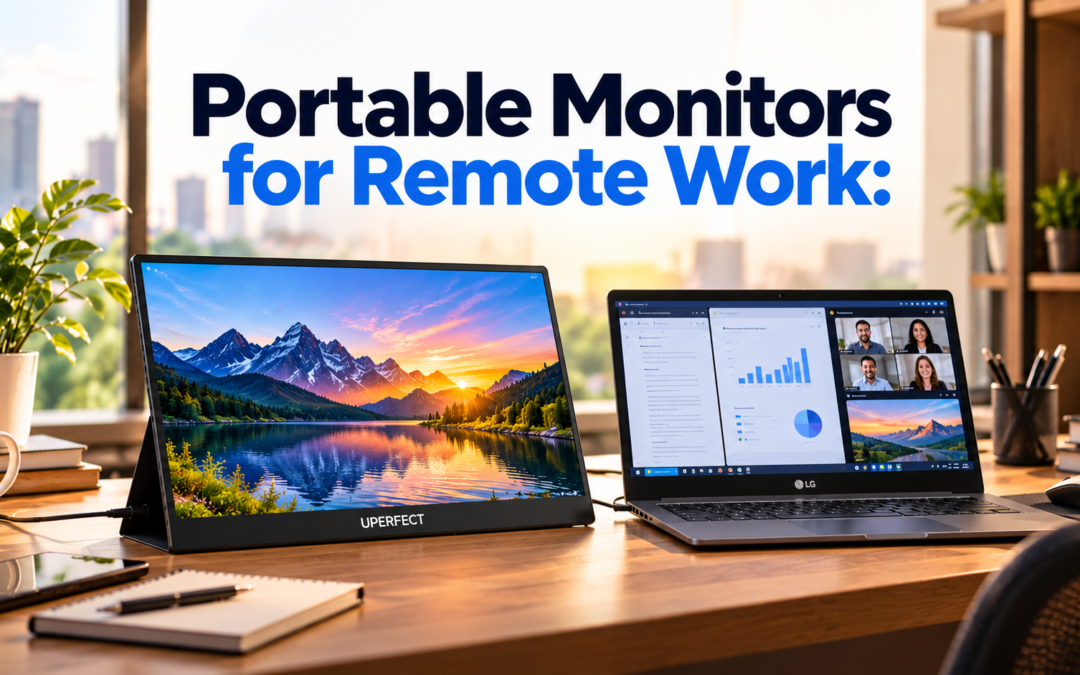
Remote work has changed what a productive workspace looks like. A laptop is enough for answering emails, but managing spreadsheets, attending video calls, reviewing presentations and switching between multiple applications on a single screen can quickly become frustrating. A second display gives you more room to work without requiring a permanent desk setup. That is where portable monitors for remote work become useful.
These lightweight displays can connect to compatible laptops through USB-C or HDMI, making them practical for freelancers, consultants, developers and professionals who regularly move between home, offices and travel destinations. The market includes affordable Full HD models, high-resolution displays for creative work and premium options designed to complement lightweight laptops.
We have shortlisted five options worth considering, focusing on screen quality, portability, connectivity and suitability for everyday work. The recommendations below are based on published specifications and product positioning, rather than claims of independent hands-on testing.
Source: UPERFECT
UPERFECT is a strong starting point for anyone looking for a portable display with different screen sizes, resolutions and feature combinations. Its range includes compact Full HD screens as well as larger, high-resolution options for professionals who need more workspace.
Consider the UPERFECT 17.3-inch 4K portable monitor. It offers a 3840 × 2160 resolution, an IPS panel, 400-nit rated brightness and a matte screen. The high pixel density is useful when reviewing detailed documents, working with visual assets or keeping several windows visible at once.
The larger screen is particularly useful for developers, analysts and designers who need more room than a standard 15.6-inch display provides. However, its approximately 1.21 kg weight makes it less convenient for daily travel than smaller alternatives.
Best for: Professionals who want a larger screen, high resolution and flexibility across different working environments.
2. LG gram +view 16: Best Premium Lightweight Option
Source: LG
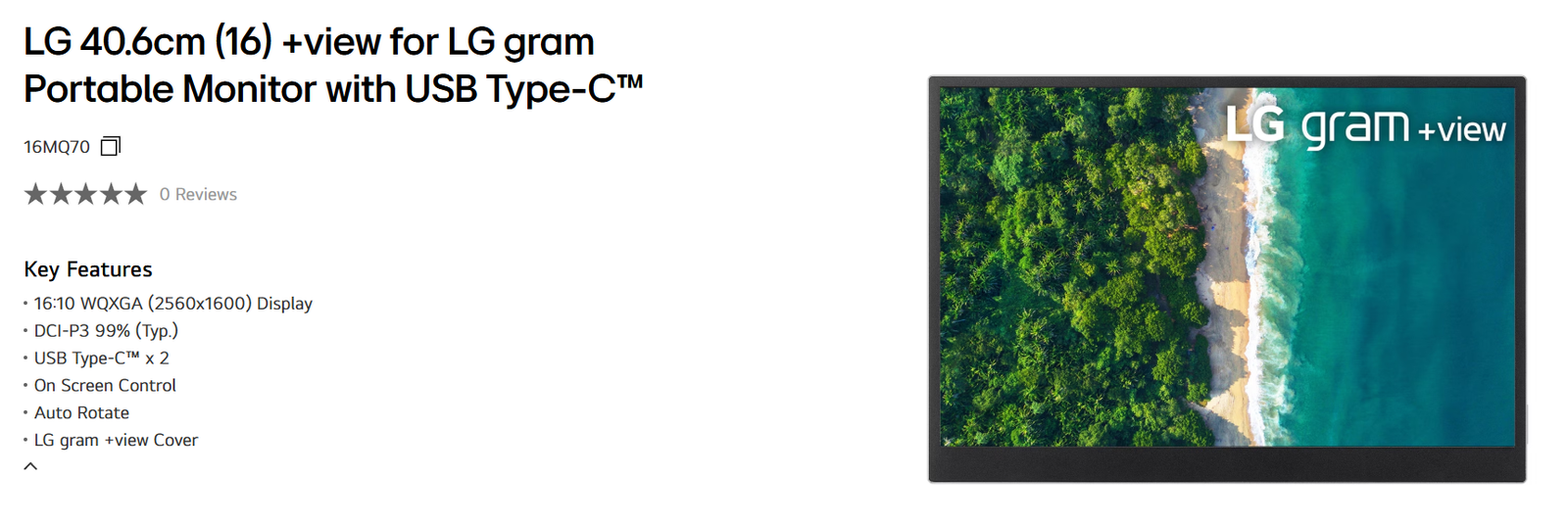
LG’s gram +view 16 is designed for people who value portability without wanting to compromise on display resolution. Its 16-inch IPS panel delivers 2560 × 1600 pixels in a 16:10 format, providing additional vertical space compared with a conventional 16:9 screen.
That extra height is helpful when reading long documents, editing code, reviewing spreadsheets or working with web pages. The display also offers 350-nit typical brightness and 99% DCI-P3 colour coverage, making it attractive for colour-conscious work.
Weighing approximately 670 grams without the folio cover, it is easy to carry alongside a laptop. Its two USB-C ports support DisplayPort Alternate Mode, but the connected computer must support compatible video output and provide sufficient power. The monitor does not have a built-in battery, so it can draw power from the laptop.
Best for: Consultants, business travellers and professionals who prioritise a lightweight, high-resolution second screen.
3. ASUS ZenScreen MB16FC: Best for Everyday Office Work
The ASUS ZenScreen range is worth considering if your daily workload revolves around email, office documents, video meetings and browser-based applications. The MB16FC is a 16-inch portable monitor with a Full HD-class workspace and a design intended for mobile productivity.
Compared with a 4K display, Full HD resolution is generally sufficient for standard office tasks while keeping the setup straightforward. It is a sensible category to explore if your priority is expanding your laptop workspace rather than editing high-resolution photographs or working on detailed visual projects.
Before purchasing, confirm the exact model’s connectivity, stand arrangement and power requirements. ZenScreen specifications vary across versions, so features from one model should not be assumed to apply to another.
Best for: Office professionals who want a practical second display for routine multitasking.
4. ARZOPA 16.1-inch FHD Portable Monitor: Best Budget-Friendly Alternative
ARZOPA offers portable displays that appeal to buyers looking for a larger workspace without immediately moving into premium pricing. Its 16.1-inch Full HD models provide a useful balance between screen area and portability.
For remote workers, the main advantage is simple: keep your meeting window on one screen while working on a document, spreadsheet or browser on the other. This reduces the constant switching that can interrupt concentration during a busy workday.
Some models also advertise higher refresh rates, kickstands and broad colour coverage. These features vary by product, so check the precise model number before comparing prices. A Full HD panel is a reasonable choice for everyday office work, although users handling intricate design work may prefer a higher-resolution screen.
Best for: Freelancers, students and remote employees who want a straightforward second screen at a more accessible price.
5. Lenovo ThinkVision M14: Best for Compact Business Travel
The Lenovo ThinkVision M14 is another option for professionals who travel frequently and want a dedicated second display without carrying a full-sized desktop monitor.
Its compact 14-inch format makes it particularly suitable for smaller laptop bags and limited hotel-room desks. A screen of this size will not offer the same working area as a 16-inch or 17.3-inch monitor, but that trade-off can make sense for people who prioritise mobility.
Before choosing it, verify the connectivity offered by the specific version and ensure your laptop supports the required USB-C display functionality. Business travellers should also consider the included stand or mounting arrangement, since a portable monitor is only useful when it can be positioned comfortably.
Best for: Frequent travellers and professionals working from temporary desks or shared spaces.
Portable Monitor Comparison Table
| Monitor |
Main advantage |
Best use case |
| UPERFECT 17.3-inch 4K |
High-resolution, large display |
Detailed work and multitasking |
| LG gram +view 16 |
2560 × 1600 resolution; approx. 670 g |
Premium mobile productivity |
| ASUS ZenScreen MB16FC |
Everyday office functionality |
Documents and meetings |
| ARZOPA 16.1-inch FHD |
Accessible Full HD option |
Budget-conscious remote work |
| Lenovo ThinkVision M14 |
Compact form factor |
Frequent business travel |
Specifications differ by model and regional availability. The UPERFECT and LG specifications above refer to the specific products identified in their descriptions.
What to Check Before Buying a Portable Monitor
Choosing between portable monitors for remote work involves more than comparing screen sizes.
1. Connectivity comes first. A USB-C port does not automatically guarantee video output. Your laptop’s USB-C port must support DisplayPort Alternate Mode or another compatible display protocol. If you plan to use HDMI, check whether the monitor includes the appropriate input and whether separate power is required.
2. Resolution should match your workload. Full HD is usually adequate for email, spreadsheets and meetings. A 2560 × 1600 panel provides more workspace, while 4K can benefit detailed visual work. Remember that higher resolution may require scaling to keep text comfortable to read.
3. Consider power consumption and ergonomics. Many portable monitors draw power from the laptop, which can reduce battery life. A stable stand, adjustable viewing angle and matte screen can make a noticeable difference during long working sessions.
Finally, compare the complete package rather than the screen alone. Check the included cables, protective cover, warranty, return policy and local service availability before placing an order.
Portable Monitors for Remote Work: Frequently Asked Questions
1. Are portable monitors worth buying for remote work?
Yes, particularly if your work involves frequent multitasking. A second screen can keep reference documents, spreadsheets or meetings visible while you work on your main display.
2. Is UPERFECT better than LG for portable monitors?
Neither brand is universally better. UPERFECT offers a varied range, including larger 4K displays, while the LG gram +view 16 prioritises a lightweight design and a high-resolution 16:10 panel. Your workload and portability requirements should guide the decision.
3. Can I connect a portable monitor to any laptop?
Not necessarily. Check whether your laptop supports video output through USB-C. If it does not, an HDMI connection or another compatible solution may be required.
Also Read: AirAsia MOVE Review: Flights, Hotels, Deals and Booking Experience

by parth@bidkinetic.com | Oct 13, 2026 | Gadgets
Pet hair is one of the toughest everyday cleaning problems because it does not stay neatly on the floor. Short fur collects along skirting boards, long hair wraps around brush rollers, and shedding gets pressed into carpet fibres long before it becomes obvious. The best robot vacuums for pet hair need to do more than advertise strong suction: they must collect loose fur consistently, resist tangles, navigate around pet toys and keep working without constant maintenance.
Independent testing reflects these differences. RTINGS’ 2026 pet-hair comparison evaluates debris pickup, carpet performance, brush design and obstacle handling, while Vacuum Wars measures how much hair remains on brushes after dedicated tangling tests. Its testing methodology includes pressing pet hair into carpet before measuring pickup, a more demanding scenario than vacuuming loose fur from a hard floor.
For this roundup, the focus is on models with relevant pet-hair performance evidence, practical features and clear strengths for different homes. It is not a claim that every vacuum was physically tested by the author. The right choice depends on whether your pet sheds heavily, your home has carpets or hard floors, and how much daily maintenance you are willing to handle.
The Best Robot Vacuums for Pet Hair at a Glance
| Robot vacuum |
Best for |
Main advantage |
Consider before buying |
| Roborock Saros Z70 |
Premium all-round cleaning |
Strong hard-floor pickup and multifunction dock |
Expensive; some advanced obstacle features can be inconsistent |
| Dreame L60 Ultra PE |
Embedded pet hair |
Strong carpet-focused hair pickup and anti-tangle brush |
Check availability and exact regional configuration |
| Dreame L60 Pro Ultra |
Heavy-shedding homes |
Detangling brush, self-emptying and mop maintenance |
Premium features may be unnecessary for small homes |
| eufy L60 |
More affordable cleaning |
Hair-cutting technology on applicable versions |
Obstacle avoidance is limited compared with premium models |
| Shark PowerDetect |
Vacuum-only households |
Pet-focused cleaning without paying for a full mop system |
Confirm the exact model and dock configuration |
1. Roborock Saros Z70: Best Premium All-Rounder
The Saros Z70 is a strong option for homes where pet hair is only one part of the mess. It got excellent hard-floor pickup, good carpet hair removal and a multifunction dock that empties the robot and maintains its mop pads. Its standout feature is a mechanical arm designed to pick up small objects such as socks and shoes, although performance with that feature can be inconsistent.
That makes it appealing for households where pets leave fur alongside toys and everyday clutter. The limitation is price: if your main requirement is collecting hair from a few rooms, a less expensive vacuum may provide better value.
Source: Dreame
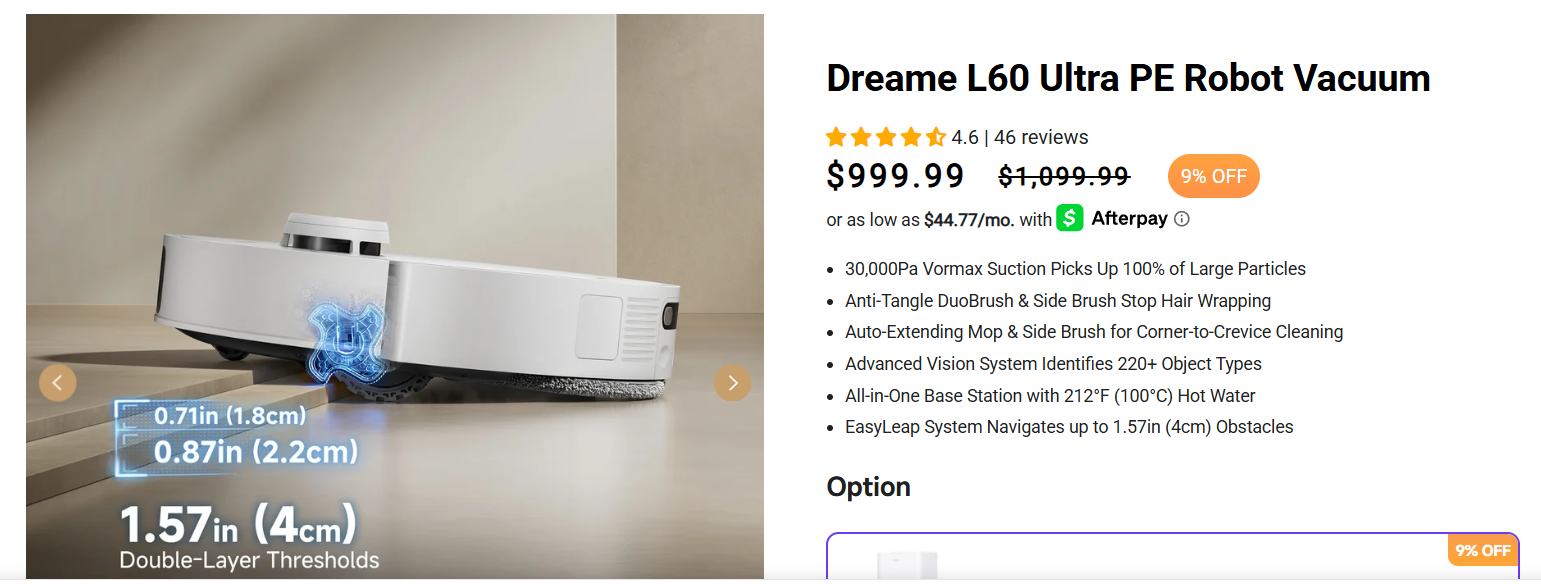
The Dreame Robot Vacuum range deserves particular attention if fur gets trapped in carpets rather than simply lying on hard floors. Specialist testing highlights the L60 Ultra PE as a strong option for embedded hair, with reported results of complete pickup in a flattened-hair test and no hair wrap in a dedicated brush test. Those are specific test outcomes, not a guarantee that every home will see identical results.
Its appeal is the combination of hair pickup and reduced brush maintenance. That matters if you have a long-haired dog or cat and do not want to cut tangled fur from the roller every few cleaning cycles. Before buying, check the exact model name and regional specification, as Dreame’s product range and included accessories vary by market.
Source: Dreame
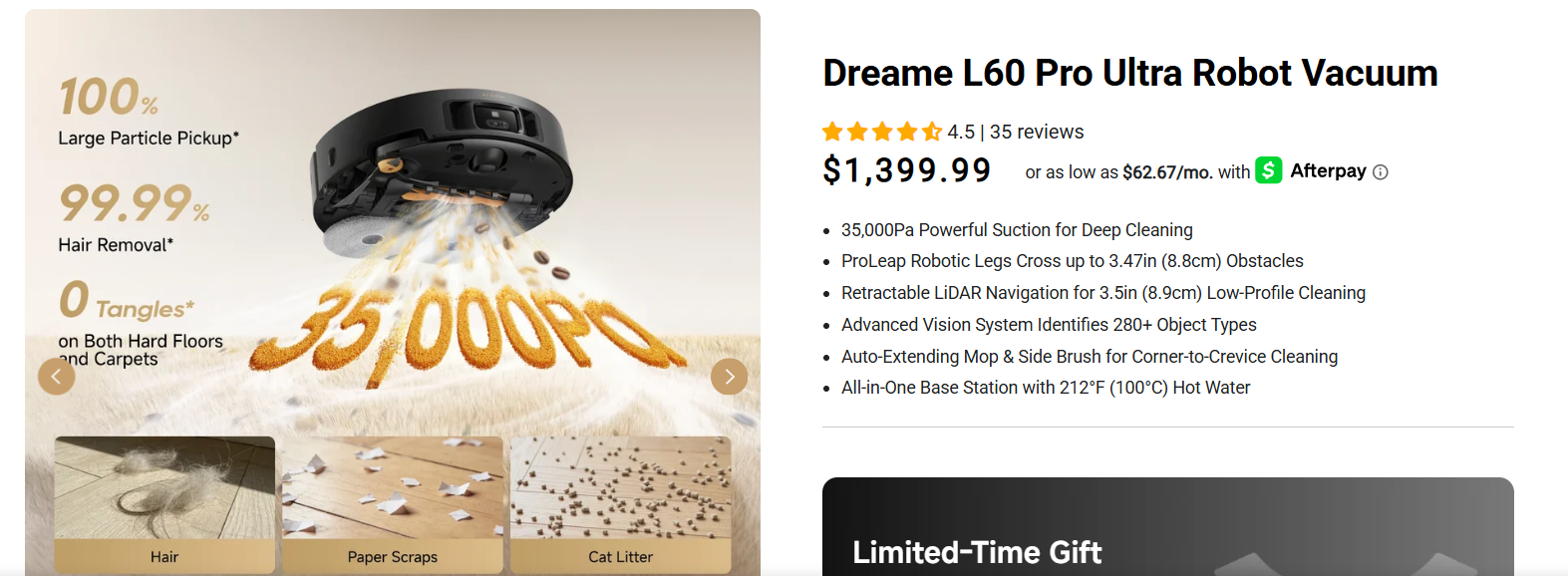
For households dealing with fur every day, the L60 Pro Ultra combines a detangling brush design with automated dust collection and mop-pad maintenance. Dreame lists it among its pet-focused models, with 35,500 Pa of stated suction power and obstacle recognition features. These are manufacturer specifications; suction figures alone do not establish how well a robot removes hair from every carpet.
The bigger benefit is less hands-on maintenance. A self-emptying dock reduces how often you need to empty the onboard bin, which can fill quickly during shedding season. However, a large dock takes up floor space, and mop-washing features add cost and upkeep. Choose this model if you will use the full system, not simply because its specification sheet has the largest numbers.
4. eufy L60: Best Budget-Friendly Option
The eufy L60 is worth considering if you want a straightforward robot vacuum without paying for a premium all-in-one station. Its hair pickup on carpet can be better than that of the Auto-Empty C10, but it lacks a dedicated obstacle-avoidance system and relies on bump sensors.
That distinction matters in pet homes. Fur is manageable, but charging cables, toys and unexpected messes can interrupt a cleaning run. The L60 can suit a relatively tidy home with hard floors or low-pile rugs, provided you pick up small objects first. Confirm whether the version you are buying includes the self-empty station, since bundles can differ.
5. Shark PowerDetect: Best for Homes That Do Not Need Mopping
A vacuum-only robot can be the sensible choice if you mainly want to collect fur, crumbs and tracked-in dirt. Vacuum Wars maintains a pet-hair ranking based on independent pickup and hair-tangling evaluations, while recent specialist roundups also highlight Shark’s pet-focused cleaning performance.
The advantage is simplicity: you are not paying for mop washing and drying if you rarely need wet cleaning. Before choosing a Shark PowerDetect model, check whether it has a self-empty dock, what brush system it uses and whether the specific version offers the navigation features you want. The PowerDetect name covers different configurations, so specifications should not be assumed to apply to every model.
What Matters Most When Cleaning Up Pet Hair?
The brush system is often more important than a headline suction figure. Long fur can wind around a roller, reducing cleaning efficiency and forcing frequent manual detangling. Look for an anti-tangle or detangling brush, and check independent reviews for actual hair-pickup results.
Carpet owners should prioritise brush agitation and deep-cleaning performance. Hard-floor households can often get away with a less expensive model, provided it collects fur along edges and around furniture. A self-emptying dock is especially useful for multiple pets, while obstacle recognition matters if toys, food bowls and cables are routinely left on the floor.
Finally, consider filtration. Pet hair is visible, but dander and fine dust are not. A well-sealed dust system and accessible filters can help manage everyday debris, although no robot vacuum eliminates allergens completely.
How to Choose the Right Model for Your Home
- One short-haired pet and mostly hard floors: Start with the eufy L60 or another affordable model with good pickup results.
- Long-haired pets or carpeted rooms: Consider the Dreame L60 Ultra PE, paying close attention to independent hair and brush-tangling tests.
- Several pets and frequent shedding: A Dreame L60 Pro Ultra or comparable self-emptying model can reduce daily intervention.
- Pets that leave clutter everywhere: A premium model with obstacle recognition may help, but clear away toys and cables before cleaning.
The best robot vacuums for pet hair are the ones that match your flooring and cleaning routine, not necessarily the ones with the highest suction number. Check replacement brush costs, filter availability and the dock’s maintenance requirements before committing to a premium purchase.
Robot Vacuums for Pet Hair: Frequently Asked Questions
1. Are robot vacuums good for pet hair?
Yes. They are particularly useful for collecting loose fur daily before it accumulates under furniture or gets embedded in carpets. They complement, rather than always replace, occasional deep cleaning.
2. Is Dreame a good choice for pet owners?
Dreame offers pet-focused models with detangling brushes, self-emptying docks and obstacle recognition. The L60 Ultra PE and L60 Pro Ultra are worth comparing, but independent performance tests and local pricing should guide the final decision.
3. Do robot vacuums get pet hair tangled in their brushes?
They can. Anti-tangle designs reduce the problem, but long hair may still need to be removed periodically. Check the brush and side-brush maintenance instructions for your chosen model.
